


If you keep an email list or collect data through a form on your site, it’s your job to keep that data safe. That’s not just good manners. It’s the law in most of the world.
After years working in email, I’ve seen privacy go from a nice-to-have to a make-or-break. Get it right and you build trust, protect your sender reputation, and stay out of legal trouble. Get it wrong and you risk fines, blocklists, and lost customers.
This guide covers what email data privacy means, the regulations that affect you (GDPR, CAN-SPAM, CASL, and CCPA/CPRA). You’ll also learn practical steps to stay compliant while keeping your emails landing in the inbox.
Understanding Email Data Privacy
Email data privacy is about protecting the personal information you collect, store, and use when you send email.
Personal data is more than just an email address. When you send email, you’re likely handling:
- Names
- Email addresses
- Physical addresses
- Phone numbers
- Dates of birth
- Purchase histories
- Interests and preferences
Treat all of it as sensitive. In the wrong hands, even a simple list of email addresses can fuel phishing and fraud. Your subscribers trusted you with their data, and protecting it is part of keeping that trust.

Whether you send transactional emails or marketing campaigns, you might collect data through sign-up forms, online purchases, tracking pixels, and cookies. You then use it to personalize content, segment your audience, and measure performance. Respecting that data builds trust and protects you from legal trouble.
How Data Privacy Affects Sender Reputation and Deliverability
Privacy isn’t just a legal box to tick. It directly shapes whether your emails reach the inbox.

Here’s how good privacy practices help your deliverability:
- They build trust: People who trust you open and click more, and engagement is what mailbox providers reward.
- They reduce complaints: Clear consent means fewer “I never signed up for this” spam reports.
- They keep your list clean: Proper opt-in and data hygiene cut bounces and dead addresses.
- They let you personalize without being creepy: Use data openly and sparingly, and personalization helps instead of unsettling people.
Sending only to people who asked is also the simplest way to avoid being blocklisted, which can severely damage your deliverability.

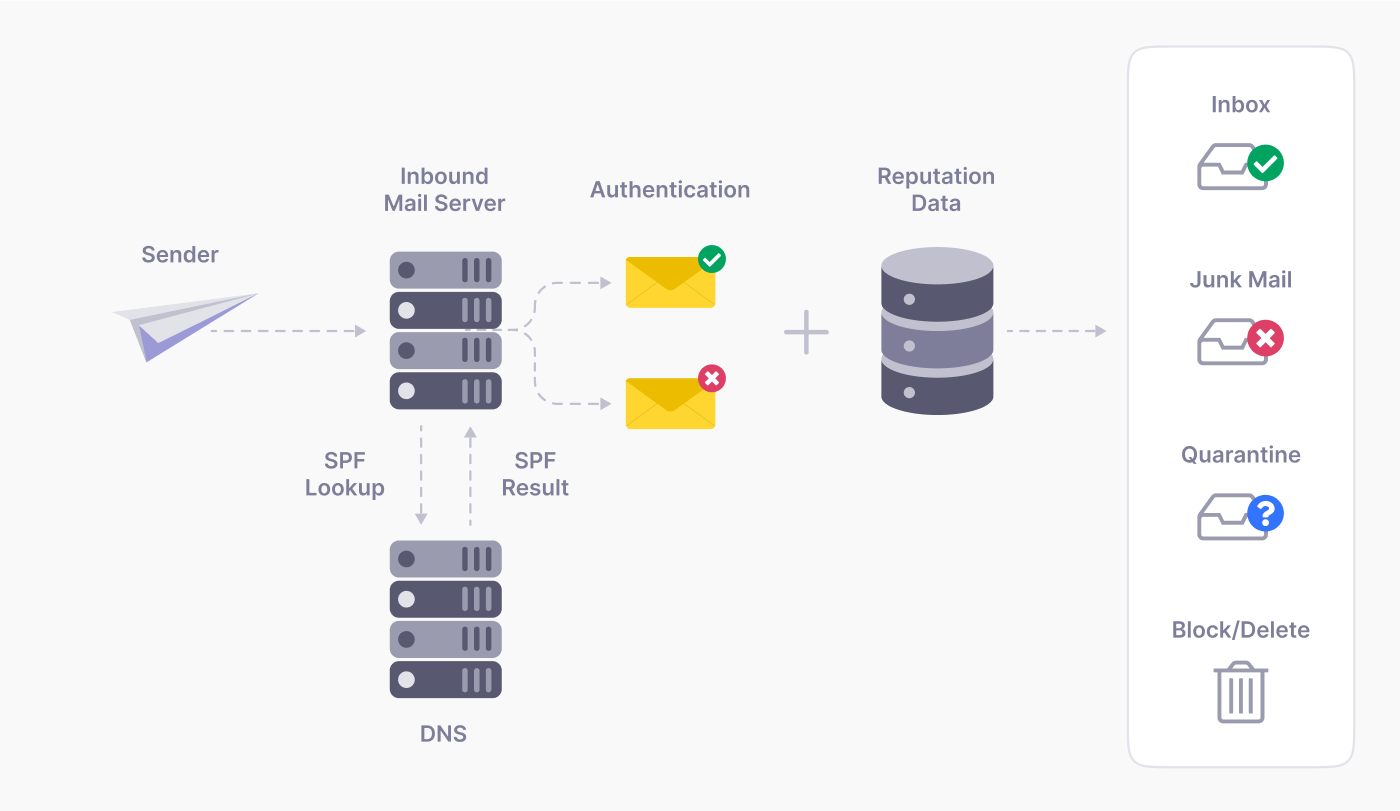
Privacy and authentication also go hand in hand. Mailbox providers favor senders who follow best practices, and many email authentication protocols like DMARC signal that you’re a trustworthy sender. That means better inbox placement.
The flip side is just as real. Sloppy privacy leads to complaints, a damaged sender reputation, and more spam complaints that drag down your delivery.
Key Privacy Regulations Impacting Transactional and Marketing Emails
A handful of laws govern how you handle email data. Which ones apply depends on where your recipients live, not where you are. These points explain the key aspects, but for specific advice it’s always best to consult a legal professional.
One quick framing before the details: CAN-SPAM lets you email people until they opt out. GDPR, CASL, and CCPA expect permission or clear rights first. That difference drives most of what follows.
General Data Protection Regulation (GDPR)

The GDPR applies to any organization that processes the personal data of EU residents, wherever that organization is based. It requires explicit, opt-in consent, with no pre-ticked boxes.
Consent must also be granular. If you want to send both a newsletter and promotional offers, those are two separate opt-ins. People also have the right to access their data and request its deletion. Penalties are steep: up to €20 million or 4% of global annual turnover, whichever is higher.
CAN-SPAM Act

CAN-SPAM is the main US law, in force since 2003. It’s less restrictive than the GDPR, but it still has firm rules. Every commercial email needs honest subject lines and headers, a clear way to opt out, and a valid physical postal address.
It works on an opt-out basis: you can email people until they unsubscribe, but you must honor opt-outs quickly. Fines can exceed $50,000 per individual email, and the FTC adjusts that figure for inflation.
Canada’s Anti-Spam Legislation (CASL)
CASL is one of the strictest anti-spam laws in the world. It requires express consent before you send a commercial message, every message needs a clear unsubscribe option, and opt-out requests must be honored within 10 business days. Penalties run up to $10 million per violation for businesses.
California Consumer Privacy Act (CCPA/CPRA)
If you have customers in California, the CCPA (strengthened by the CPRA) applies. It gives consumers the right to know what personal data you collect, the right to have it deleted, and the right to opt out of having it sold or shared.
For email, that means honoring data-deletion requests and being transparent about what you collect and why. Penalties run up to $2,500 per violation, or $7,500 for each intentional one, which adds up fast across a large list.
A Quick Email Compliance Checklist
The laws differ, but a few habits keep you safe across all of them:
- Use clear, specific opt-in language, and never pre-tick consent boxes.
- Keep a record of when and how each subscriber consented.
- Put a visible, one-click unsubscribe link in every marketing email.
- Have a simple process to delete someone’s data when they ask.
Do these six things and you’ll meet the core of every major regulation, wherever your subscribers live.
Best Practices for Maintaining Email Data Privacy
Compliance comes down to how you collect, store, and eventually delete data.
Data Collection
Collect only what you need, and be upfront about it. Use a clear opt-in with unchecked boxes, and never assume consent with pre-ticked options.

Confirm sign-ups with a double opt-in for added verification, which providers like Gmail recommend. It proves the address is real and willing.

Link to a plain-language privacy policy at signup, keep your forms short so you collect less, and make it easy for people to update their preferences or unsubscribe at any time.
Data Storage
Once you have the data, keep it locked down. Use a reputable, secure email platform like SendLayer, and turn on multi-factor authentication for access to sensitive data.
Send over encrypted connections (TLS) to prevent interception in transit, and set up your authentication protocols. SPF, DKIM, and DMARC work together to verify your email genuinely comes from your domain and hasn’t been tampered with.

Set a data-retention policy specific to email data, including subscriber lists and engagement metrics. Decide how long you need each type of data, and automate the deletion or anonymization of anything you no longer need.
Handling Data Requests and Deletion
GDPR and CCPA both give people the right to see their data and to have it deleted. Be ready for those requests.
Keep your data organized so you can find a single person’s records quickly. When someone asks to be forgotten, remove them from your active lists and your backups, and confirm it’s done. A clean, documented process turns a scary legal obligation into a routine task.
AI and Email Data Privacy
AI can sharpen your email personalization, but it raises new privacy questions.

AI makes advanced personalization, predictive analytics, and automated content possible. But those models often process large amounts of personal data, so make sure subscribers know how their data is being used to tailor their experience.
When you feed subscriber data into an AI tool, ask where that data goes. Is it used to train someone else’s model? Is it stored securely? You’re still responsible for that data, even when a tool processes it for you. Only process what’s necessary, and never hand customer data to platforms that use your inputs to train their models.
Regulators are catching up fast, and AI-specific privacy rules are arriving. The safe approach in 2026 is the same as always: collect less, be transparent, and only work with tools that are clear about how they handle your subscribers’ data.
Frequently Asked Questions
What counts as personal data in email?
Anything that can identify a person: their email address, name, mailing address, purchase history, and even browsing or preference data. Treat all of it as sensitive.
Do I need consent to send transactional emails?
Generally no. Transactional emails (receipts, password resets, account alerts) are tied to a service the person requested, so they’re treated differently from marketing email. Keep them strictly transactional, with no promotional content mixed in.
What’s the difference between GDPR and CAN-SPAM?
GDPR requires opt-in consent before you email EU residents and applies worldwide. CAN-SPAM is a US opt-out law: you can email people until they unsubscribe, as long as you include honest headers, a physical address, and an easy opt-out.
Does GDPR apply to my business if I’m not in Europe?
Yes, if you process the personal data of EU residents. The law follows the data subject, not your location.
How do I make my emails compliant?
Use clear opt-in, log consent, include a one-click unsubscribe and a physical address, send separate opt-ins for separate purposes, and have a process to delete data on request.
How long can I keep subscriber data?
Only as long as you have a legitimate reason to. Set a data-retention policy, review your list regularly, and delete data you no longer need.
That’s it! Now you know about email data privacy.
Next, do you need some inspiration for your email designs? Check out our roundup of the best welcome email examples for new customers.
Ready to send your emails in the fastest and most reliable way? Get started today with the most user-friendly and powerful SMTP email delivery service. SendLayer Business includes 5,000 emails a month with premium support.
