What does your email deliverability score tell you?
It answers one question about the message you sent: what is the possibility of your email landing in your recipient inbox, and not in the spam folder, or rejected by the recipient’s server. Authentication and blacklist problems pull it down hardest, so a low score usually points there first.
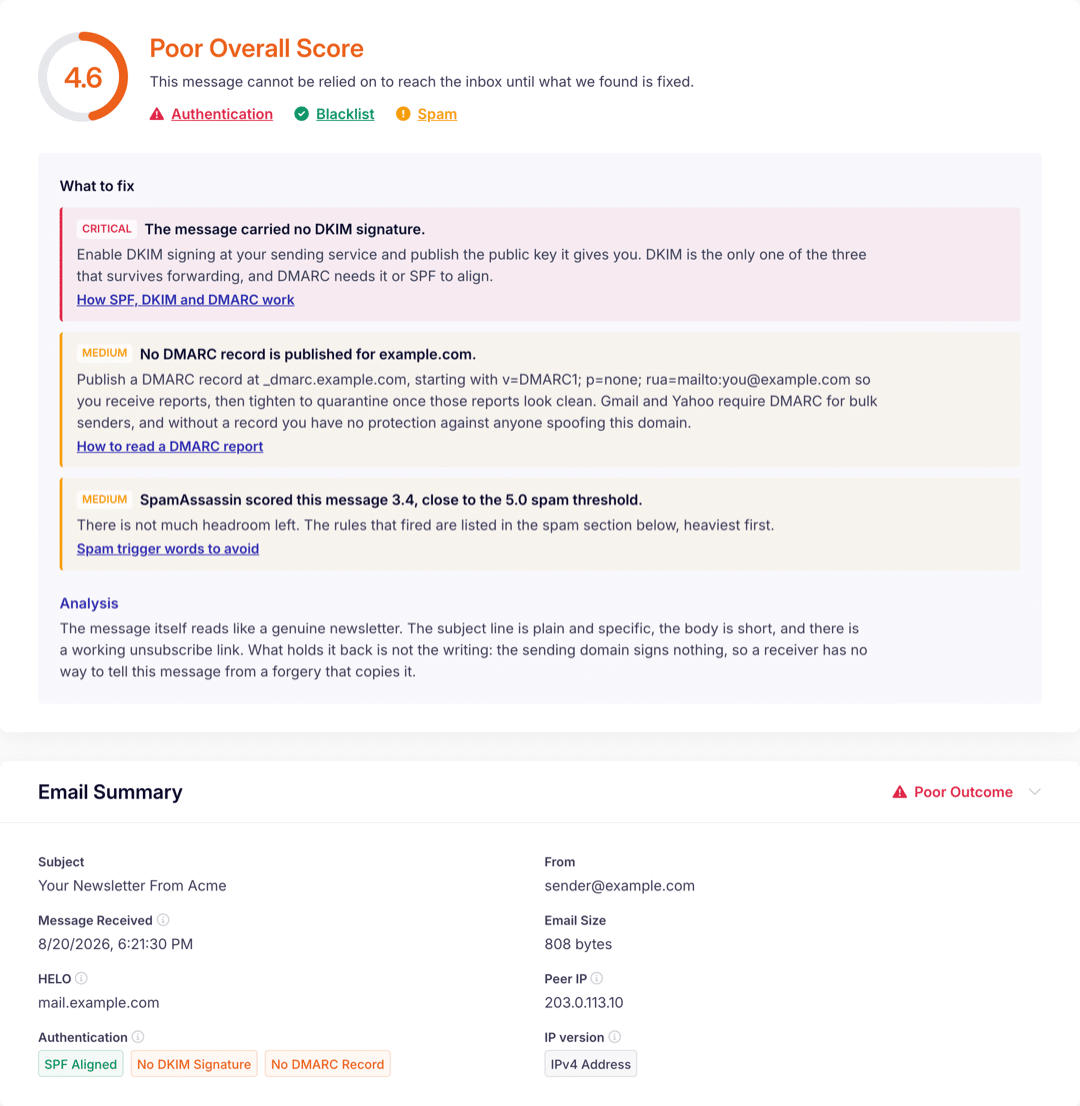
The score card shows the score, a verdict for each of Authentication, Blacklist and Spam, and how many things there are to fix.
Report with steps to improve the email deliverability
The full report turns that count into steps for you to fix, to improve the deliverability. Each one carries a Critical, High, Medium or Low badge. Some are things you can improve on your own and some can also point to your email sending provider issues.
Behind each verdict, the full report shows the SPF, DKIM and DMARC results, every blacklist queried and what it said, and the SpamAssassin rules that fired with their weights.
It also carries the written analysis and a summary of the message we received, including its subject, the HELO name your server gave and the IP it connected from.
How to test your email deliverability
The test runs on a real message, so the only thing you supply is an email you can send from the account you want to test.
Open Email Detective. It gives you a one-off email address, with a Copy button beside it.
Send an email to that address from the account or the app you want to test. Use the kind of message you normally send, because the spam score and the written analysis read the message itself.
Watch the page. It waits for your message, then fills in the score card as each check finishes.
What the email spam checker looks at
Four checks run on the message you send. The three below each get their own verdict. The fourth is a written analysis of the message itself, its subject line and its wording.
Authentication
SPF, DKIM and DMARC, read from the message that reached us. These three are the strongest proof to a receiving server that the mail really came from your domain.
Blacklists
The IP address that delivered your message and the domain it came from, both checked against public block lists. Each list and its outcome are named in the full report.
Spam filtering
A SpamAssassin score for the message, in the full report with every rule that fired, the weight it carried and what it flagged.
A receiving server decides where your message goes before anybody reads it. It weighs whether your domain vouched for the send, what your sending IP and domain look like on public block lists, and what the message itself says. Well-written copy sent from an unauthenticated domain still lands in spam.
Authentication comes first, because it decides whether a receiver trusts your domain at all. How SPF, DKIM and DMARC work shows what each record looks like and how to tighten a DMARC policy in stages.
Yes. There is no signup and no account. The score, a verdict for each of the three checks and the number of things to fix are free on the page. Seeing the full report will require an email address: we email you a link that unlocks it, and we add that address to SendLayer’s mailing list, so you may hear from SendLayer about deliverability and its products. Every email has an unsubscribe link, and you can unsubscribe without losing access to your report.
What do I need to run an email spam test?
One email you can send from the account you want to test, and the address Email Detective gives you when you open it. There is nothing to install.
How do I test an email for spam before I send a campaign?
Send the message to the address the tool gives you, worded the way you plan to send it. You get a spam verdict on the page, and the full report shows the SpamAssassin score with every rule that fired.
Which records does the checker read?
SPF, DKIM and DMARC, as they applied to the message that reached us. The full report shows the result for each one.
Do you keep the spam test email I send?
The message you sent and the report built from it are both deleted 30 days after the message arrives, and the link in your report email works for the same 30 days.
Can I share my report with somebody else?
Yes. Anyone with the link can open it, so share it with people that need to take action to improve your email deliverability.
Run the test on your next email
Email Detective is free and needs no account. If your results point at your sending setup rather than at the message, take a look at what SendLayer costs.
We use cookies to improve your experience on our site. By using our site, you consent to cookies.
This website uses cookies
Websites store cookies to enhance functionality and personalise your experience. You can manage your preferences, but blocking some cookies may impact site performance and services.
Essential cookies enable basic functions and are necessary for the proper function of the website.
Name
Description
Duration
Cookie Preferences
This cookie is used to store the user's cookie consent preferences.
30 days
Cookie Preferences
This cookie is used to store the user's cookie consent preferences.
30 days
Cookie Preferences
This cookie is used to store the user's cookie consent preferences.
30 days
Cookie Preferences
This cookie is used to store the user's cookie consent preferences.
30 days
Cookie Preferences
This cookie is used to store the user's cookie consent preferences.
30 days
Cookie Preferences
This cookie is used to store the user's cookie consent preferences.
30 days
Statistics cookies collect information anonymously. This information helps us understand how visitors use our website.
Google Analytics is a powerful tool that tracks and analyzes website traffic for informed marketing decisions.
SourceBuster is used by WooCommerce for order attribution based on user source.
Name
Description
Duration
sbjs_first_add
Timestamp, referring URL, and entry page for your visitor’s first visit to your store (only applicable if the visitor returns before the session expires)
session
sbjs_current_add
Timestamp, referring URL, and entry page for your visitor’s current visit to your store
session
sbjs_migrations
Technical data to help with migrations between different versions of the tracking feature
session
sbjs_session
The number of page views in this session and the current page path
30 minutes
sbjs_udata
Information about the visitor’s user agent, such as IP, the browser, and the device type
session
sbjs_first
Traffic origin information for the visitor’s first visit to your store (only applicable if the visitor returns before the session expires)
session
sbjs_current
Traffic origin information for the visitor’s current visit to your store