



Does your Flask app need to send password resets, receipts, or contact form alerts? Every one of those starts with the same small piece of code that sends emails in Flask.
Flask doesn’t ship with email support. You pick an extension or an email API. Older tutorials disagree on which one to use.
I’ll show you how to send emails in Flask with SMTP or an API. These examples use Flask 3.1, Flask-Mail 0.10, Flask-Mailman 1.1, and the SendLayer SDK 1.1.
How to Send Emails in Flask
You send emails in Flask in one of 2 ways. You can connect to an SMTP server through an extension like Flask-Mail. Or you can call an email provider’s API over HTTPS with its Python SDK.
Both work in production. SMTP works with almost any email provider. An API gives you clearer errors and works where SMTP ports are blocked.
| Method | Install | Best for |
|---|---|---|
| Flask-Mail (SMTP) | pip install Flask-Mail | Most Flask apps. Simple and well documented |
| Flask-Mailman (SMTP) | pip install flask-mailman | Teams who know Django’s mail API or want console/file backends |
| Email API (SendLayer SDK) | pip install sendlayer | Hosts that block SMTP ports, or when you want typed errors and webhooks |

Prerequisites
Here’s what you need before you start:
- Python 3.9 or newer: Flask 3.1 requires it. You can download it from python.org.
- Basic Python knowledge: You should be comfortable with functions and pip.
- An email service with SMTP or API access: I’m using SendLayer for this tutorial.
After you create your SendLayer account, authorize your sending domain. This adds the DNS records that help your emails reach the inbox instead of spam.
How to Install Flask
To install Flask, create a virtual environment and install Flask with pip. If you already have a Flask app, skip to sending email with SMTP.
First, create a virtual environment for the project:
python3 -m venv env
Then activate it:
source env/bin/activate # On Windows use: env\Scripts\activate
Next, install Flask and python-dotenv. It loads your credentials from a .env file, so they stay out of your code.
pip install Flask python-dotenv
Create this project structure:
Open app.py and add a minimal Flask app:
from flask import Flask, jsonify

app = Flask(__name__)

@app.route("/")
def home():
    return jsonify({"message": "Hello World"})

if __name__ == "__main__":
    app.run(debug=True)
app = Flask(__name__) creates the app. The @app.route() decorator maps a URL to the function below it.
debug=True shows detailed errors while you build. Turn it off in production, because debug pages expose server details.
How to Send Email in Flask with SMTP
For SMTP, I’ll use Flask-Mail. It wraps Python’s built-in smtplib and reads its settings from your Flask config. For raw smtplib, see our guide to sending emails in Python.
Step 1: Install Flask-Mail and Add Your SMTP Settings
Install the extension:
pip install Flask-Mail
Then add your SMTP settings to the .env file:
MAIL_DEFAULT_SENDER is the address every message comes from unless you set a different sender. Use an address on the domain you authorized in SendLayer.
Warning: Add .env to your .gitignore. Committing it to GitHub publishes your SMTP password.
To find your SendLayer credentials, log in to your SendLayer account. Then go to Settings » SMTP Credentials.
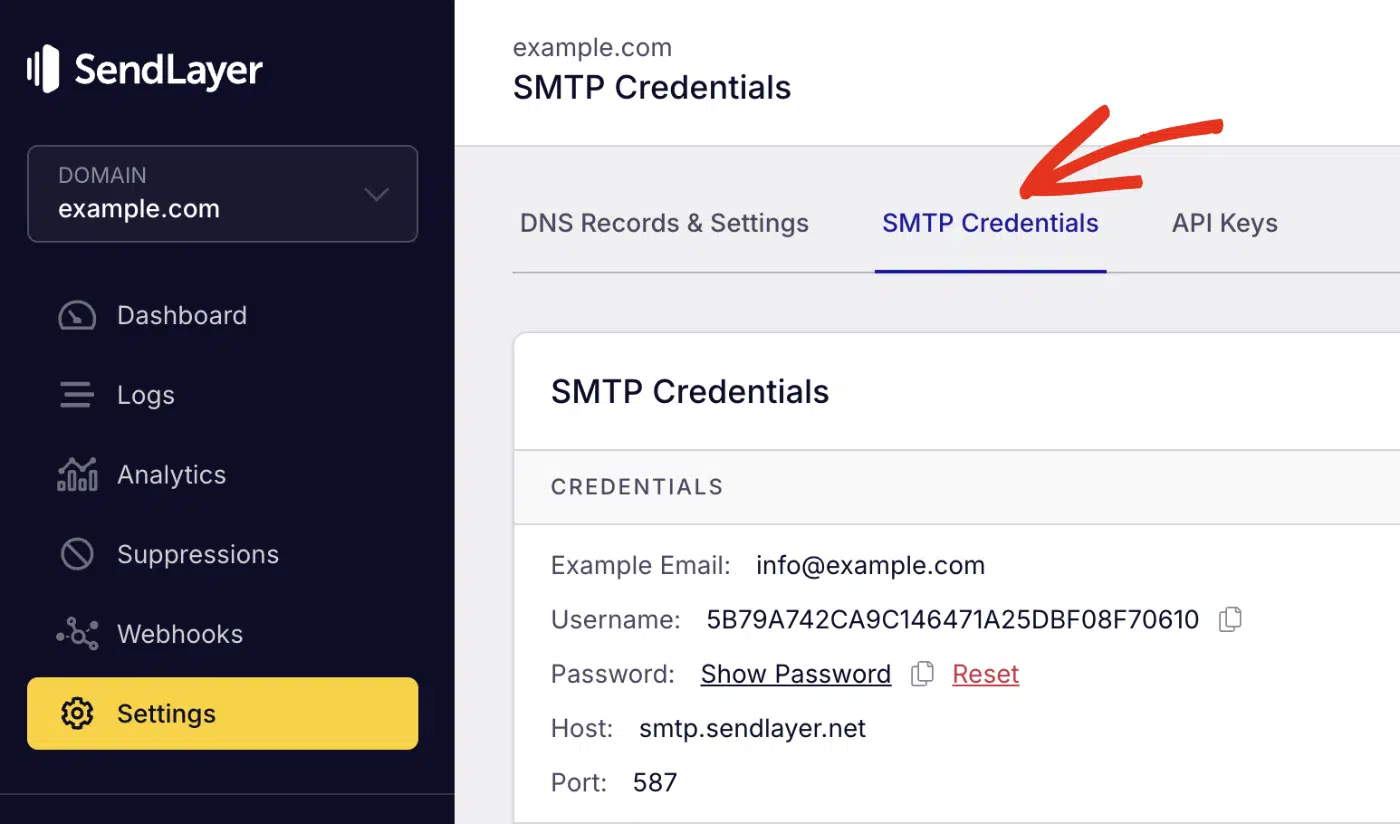
The host and port are the same for every account. The Username and Password are unique to yours, so paste them into MAIL_USERNAME and MAIL_PASSWORD.
Step 2: Send a Plain Text Email
Now replace the contents of app.py with this:
import os

from dotenv import load_dotenv
from flask import Flask, jsonify, request
from flask_mail import Mail, Message

load_dotenv()

app = Flask(__name__)

app.config["MAIL_SERVER"] = os.getenv("MAIL_SERVER")
app.config["MAIL_PORT"] = int(os.getenv("MAIL_PORT", 587))
app.config["MAIL_USE_TLS"] = os.getenv("MAIL_USE_TLS") == "True"
app.config["MAIL_USE_SSL"] = os.getenv("MAIL_USE_SSL") == "True"
app.config["MAIL_USERNAME"] = os.getenv("MAIL_USERNAME")
app.config["MAIL_PASSWORD"] = os.getenv("MAIL_PASSWORD")
app.config["MAIL_DEFAULT_SENDER"] = os.getenv("MAIL_DEFAULT_SENDER")

mail = Mail(app)


@app.route("/send-email", methods=["POST"])
def send_email():
    data = request.get_json()
    msg = Message(
        subject=data["subject"],
        recipients=[data["to"]],
        body=data["message"],
    )
    mail.send(msg)
    return jsonify({"message": "Email sent"})


if __name__ == "__main__":
    app.run(debug=True)  # Set debug=False in production
Code Breakdown
load_dotenv()reads your.envfile into environment variables.- The
app.config[...]lines pass those values to Flask-Mail.MAIL_PORTmust be an integer, so the code wraps it inint(). mail = Mail(app)creates the mail client. It reads the config once, right here.- The
/send-emailroute builds aMessagefrom the JSON request. Thenmail.send()sends it.
You don’t pass a sender, because Flask-Mail falls back to MAIL_DEFAULT_SENDER.
Step 3: Send a Test Email
Start the development server:
python app.py
Flask runs on port 5000 by default. In a second terminal, send a test request with cURL:
curl -X POST http://127.0.0.1:5000/send-email \
  -H "Content-Type: application/json" \
  -d '{"to": "you@example.com", "subject": "Hello from Flask", "message": "This is a test email."}'
Change "to" to an inbox you can check. You should get {"message": "Email sent"} back, and the email should arrive within seconds.
You can also call the endpoint from Postman or a frontend like React or Next.js.

Send HTML Emails using Flask
To send HTML, set the html argument on the Message. Keep body too, as a plain-text fallback for clients that don’t render HTML.
@app.route("/send-html-email", methods=["POST"])
def send_html_email():
    data = request.get_json()
    msg = Message(
        subject="Your order has shipped",
        recipients=[data["to"]],
        body="Your order is on its way. Track it at https://example.com/track/123",
        html="<p>Your order is on its way. "
             "<a href='https://example.com/track/123'>Track your package</a>.</p>",
    )
    mail.send(msg)
    return jsonify({"message": "HTML email sent"})
Notice the single quotes inside the HTML string. Escaped double quotes like \\\" leave literal backslashes in the email. That breaks the link.
Send Email to Multiple Recipients
Add each address to the recipients list. Flask-Mail also takes cc and bcc lists.
msg = Message(
    subject="Team update",
    recipients=["alex@example.com", "sam@example.com"],
    cc=["manager@example.com"],
    bcc=["archive@example.com"],
    body="The weekly report is ready.",
)
Everyone in recipients can see each other’s addresses. To send one email per user, loop over your list. Reuse one connection with mail.connect():
with mail.connect() as conn:
    for user in users:
        msg = Message(subject="Your weekly summary", recipients=[user.email],
                      body=f"Hi {user.name}, here's your summary.")
        conn.send(msg)
Send Email with Attachments
To attach a file, read it and call msg.attach(). Pass the filename, the MIME type, and the file’s bytes. It’s handy for invoices, tickets, and reports.
msg = Message(subject="Your invoice", recipients=["alex@example.com"],
              body="Your invoice is attached.")

with app.open_resource("static/invoice.pdf") as fp:
    msg.attach("invoice.pdf", "application/pdf", fp.read())

mail.send(msg)
app.open_resource() opens files relative to your app’s folder. For a file somewhere else, use Python’s open("path/to/file.pdf", "rb") instead.
Use the right MIME type for each file, like image/png for a PNG.
Use HTML Templates
To send templated emails, render Flask’s Jinja templates into the message. They work for emails just like they do for pages, and they beat long HTML strings. Create templates/email/confirm.html:
<!DOCTYPE html>
<html>
  <body style="font-family: Arial, sans-serif;">
    <p>Hi {{ name }},</p>
    <p>Thanks for signing up. Please confirm your email address:</p>
    <p><a href="{{ confirm_link }}">Confirm my email</a></p>
    <p>This link expires in 1 hour.</p>
  </body>
</html>
Add a plain-text twin at templates/email/confirm.txt:
Hi {{ name }},

Thanks for signing up. Please confirm your email address:
{{ confirm_link }}

This link expires in 1 hour.
Then add a helper that renders both versions. Import render_template from Flask first.
from flask import render_template

def send_template_email(subject, recipient, template, **context):
    msg = Message(subject=subject, recipients=[recipient])
    msg.body = render_template(f"email/{template}.txt", **context)
    msg.html = render_template(f"email/{template}.html", **context)
    mail.send(msg)
Send Emails in the Background
mail.send() blocks until the SMTP server answers. That can add a second or more to every request. You can hand the work to a thread and return right away.

Background code runs outside the request, so it needs its own app context. Pass the real app object into the thread:
from threading import Thread
from flask import current_app

def send_async_email(app, msg):
    with app.app_context():
        mail.send(msg)

def send_email_in_background(msg):
    app = current_app._get_current_object()
    Thread(target=send_async_email, args=(app, msg)).start()


@app.route("/contact", methods=["POST"])
def contact():
    data = request.get_json()
    msg = Message(
        subject=f"New message from {data['name']}",
        recipients=["support@example.com"],
        reply_to=data["email"],
        body=data["message"],
    )
    send_email_in_background(msg)
    return jsonify({"message": "Thanks! We'll be in touch."}), 202
current_app._get_current_object() gets the app behind Flask’s proxy. Without it, the thread raises RuntimeError: Working outside of application context.
reply_to makes Reply go to the person who filled in the form.
A thread is fine for low volume. If the process restarts, you lose any unsent email. For anything important, use a task queue like Celery or RQ, which retry failed jobs.
Send an Email Verification Link
To send a verification link, sign a token with itsdangerous and email a link that contains it. Flask already depends on itsdangerous, and its tokens can expire.

Add a SECRET_KEY to your .env file, then add these routes:
from flask import url_for
from itsdangerous import BadSignature, SignatureExpired, URLSafeTimedSerializer

app.config["SECRET_KEY"] = os.getenv("SECRET_KEY")
serializer = URLSafeTimedSerializer(app.config["SECRET_KEY"])


@app.route("/register", methods=["POST"])
def register():
    data = request.get_json()
    token = serializer.dumps(data["email"], salt="email-confirm")
    link = url_for("confirm_email", token=token, _external=True)
    send_template_email(
        subject="Confirm your email address",
        recipient=data["email"],
        template="confirm",
        name=data["name"],
        confirm_link=link,
    )
    return jsonify({"message": "Check your inbox to confirm your email."}), 201


@app.route("/confirm/<token>")
def confirm_email(token):
    try:
        email = serializer.loads(token, salt="email-confirm", max_age=3600)
    except SignatureExpired:
        return jsonify({"error": "This link has expired."}), 400
    except BadSignature:
        return jsonify({"error": "This link is invalid."}), 400
    # Mark the user with this email as confirmed in your database here.
    return jsonify({"message": f"{email} is confirmed."})
max_age=3600 makes the link expire after 1 hour. The salt keeps these tokens from working anywhere else you use the same key.
If someone tampers with the token, the BadSignature branch catches it. The route returns “This link is invalid.”
Flask-Mail vs. Flask-Mailman
Both extensions send email over SMTP. The main difference is their API style.
| Flask-Mail | Flask-Mailman | |
|---|---|---|
| Latest release (Oct 2026) | 0.10.0, May 2024 | 1.1.1, July 2024 |
| Maintained by | Pallets Community Ecosystem | Independent maintainer |
| API style | Message + mail.send() | Django-style EmailMessage + msg.send() |
| Test helpers | record_messages(), MAIL_SUPPRESS_SEND | Console, file, in-memory, and dummy backends |
| Async support | No | No |
Flask-Mailman ports Django’s mail module to Flask. Here’s the same plain-text route with it:
from flask_mailman import EmailMultiAlternatives, Mail

mail = Mail(app)  # reads the same MAIL_* config keys

@app.route("/send-email", methods=["POST"])
def send_email():
    data = request.get_json()
    msg = EmailMultiAlternatives(
        subject=data["subject"],
        body=data["message"],
        to=[data["to"]],
    )
    msg.attach_alternative(f"<p>{data['message']}</p>", "text/html")
    msg.send()
    return jsonify({"message": "Email sent"})
My pick for a new project is Flask-Mail, because it’s simpler. Choose Flask-Mailman if your team knows Django’s mail API. It’s also handy if you want MAIL_BACKEND = "console" to print emails while you build.
How to Send Email in Flask with Email API
An email API sends your message over HTTPS instead of SMTP. That helps in 3 cases:
- Your host blocks outgoing SMTP ports. HTTPS uses port 443, which is almost never blocked.
- You want clear errors, like “recipient is suppressed”, instead of raw SMTP codes.
- You want delivery events through webhooks, like bounces and opens.
SendLayer has an official Python SDK, so this method takes 3 steps.
Step 1: Get Your SendLayer API Key
Log in to your SendLayer account and go to Settings » API Keys.
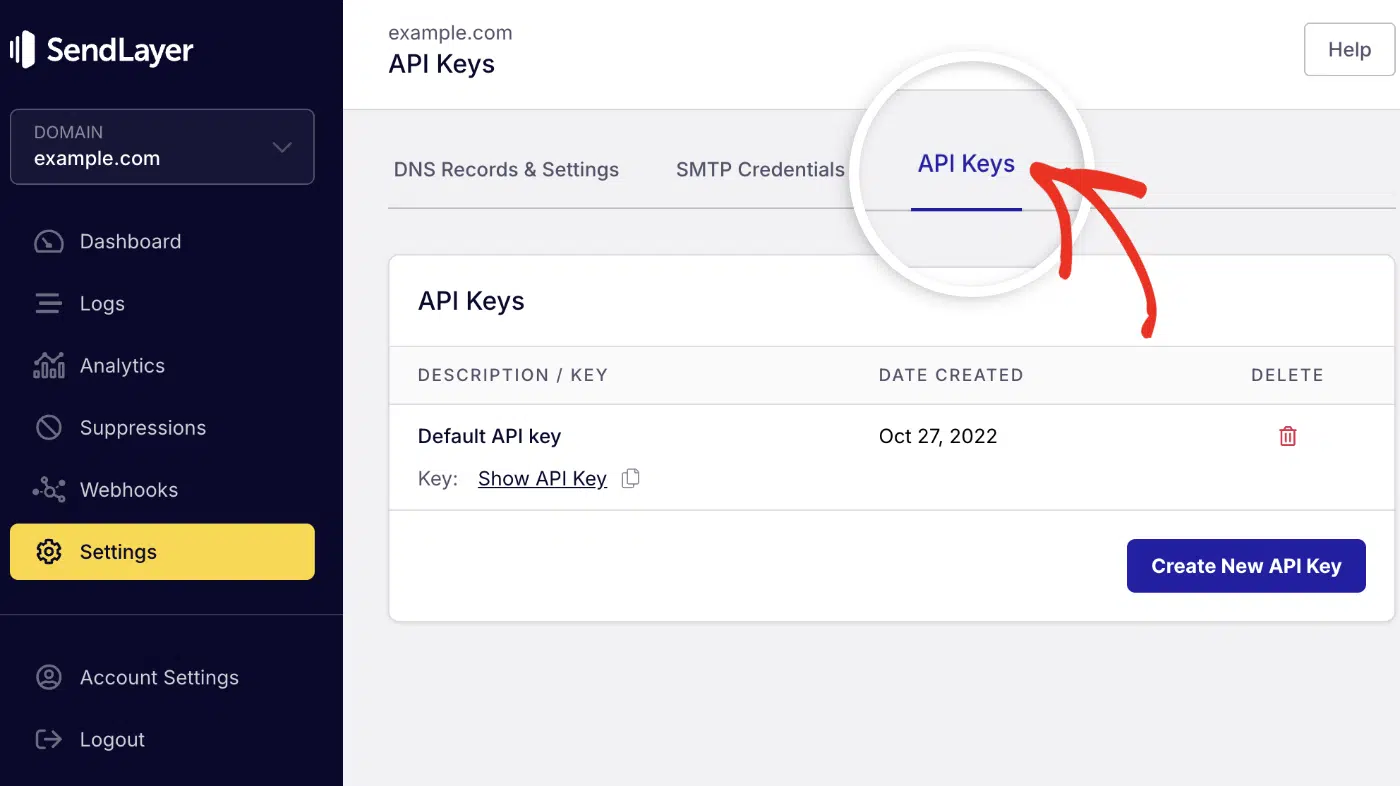
Click the copy icon next to Default API key.

Paste it into your .env file:
Step 2: Install the SDK
Install SendLayer’s Python SDK with pip:
pip install sendlayer
Step 3: Create the API Route
Now add a route that sends an HTML email. This version also handles errors:
import os

from dotenv import load_dotenv
from flask import Flask, jsonify, request
from sendlayer import SendLayer, SendLayerError, SendLayerValidationError

load_dotenv()

app = Flask(__name__)
sendlayer = SendLayer(os.getenv("SENDLAYER_API_KEY"))


@app.route("/api/send-email", methods=["POST"])
def send_api_email():
    data = request.get_json()
    try:
        response = sendlayer.Emails.send(
            sender="paulie@example.com",
            to=data["to"],
            subject=data["subject"],
            text=data["message"],
            html=f"<p>{data['message']}</p>",
        )
    except SendLayerValidationError as e:
        return jsonify({"error": e.message}), 400
    except SendLayerError as e:
        app.logger.error("SendLayer error %s: %s", e.status_code, e.message)
        return jsonify({"error": "Email could not be sent."}), 502
    return jsonify(response)


if __name__ == "__main__":
    app.run(debug=True)
Code Breakdown
SendLayer(...)creates the client with your API key.sendlayer.Emails.send()sends the message. Passing bothtextandhtmlsends both parts.SendLayerValidationErrorcovers bad input. The SDK checks every address before it calls the API.SendLayerErrorcatches everything else, like a wrong API key or a rate limit.
For example, pass "not-an-email" as the recipient. The route returns Invalid recipient email address: not-an-email before any API call.
Send Email to Multiple Recipients via API
Pass a list to to, cc, or bcc. You can also send a name with an address by using a dict:
sendlayer.Emails.send(
    sender={"email": "paulie@example.com", "name": "Paulie Paloma"},
    to=["alex@example.com", "sam@example.com"],
    cc=["manager@example.com"],
    bcc=["archive@example.com"],
    subject="Team update",
    text="The weekly report is ready.",
)
Note: Each request takes up to 10 To addresses, 10 CC, and 5 BCC. See the SendLayer rate limits for your plan’s sending limits.
Send Email with Attachments via API
Add an attachments list. Each item needs a path and a MIME type:
sendlayer.Emails.send(
    sender="paulie@example.com",
    to="alex@example.com",
    subject="Your invoice",
    text="Your invoice is attached.",
    html="<p>Your invoice is attached.</p>",
    attachments=[{"path": "static/invoice.pdf", "type": "application/pdf"}],
)
To attach more files, add more dicts to the list. Each email can be 10 MB at most, including attachments.
Test Flask Emails Without Sending Them
To test emails without sending them, turn on MAIL_SUPPRESS_SEND and use Flask-Mail’s record_messages(). Your test suite then never emails real people:
app.config.update(TESTING=True, MAIL_SUPPRESS_SEND=True)
mail.init_app(app)  # re-read the config

with mail.record_messages() as outbox:
    client = app.test_client()
    client.post("/send-email", json={"to": "a@example.com",
                                     "subject": "Hi", "message": "Test"})
    assert len(outbox) == 1
    assert outbox[0].subject == "Hi"
Important: Flask-Mail reads MAIL_SUPPRESS_SEND when Mail(app) runs. Set it before that line, or call mail.init_app(app) again.
If you set it too late, Flask-Mail ignores it, and your tests connect to the real SMTP server.
Tips for Better Email Handling
A few habits keep your email code reliable as your app grows.
1. Validate Input
Check incoming JSON before you build a message. Return a clear 400 error for missing fields, instead of a crash.
If you use the SendLayer SDK, it also checks every address before calling the API.
2. Apply Rate Limits
Set your own sending limit a little below your provider’s cap. Then a bug or bot can’t burn through your plan.
Public forms need this most. Without a limit, a spam bot can send hundreds of emails through your contact form.
3. Implement Error Handling
SMTP servers time out and credentials expire. Catch errors, log them, and return a clean response:
@app.route("/send-email-safe", methods=["POST"])
def send_email_safe():
    data = request.get_json(silent=True) or {}
    missing = [f for f in ("to", "subject", "message") if not data.get(f)]
    if missing:
        return jsonify({"error": f"Missing fields: {', '.join(missing)}"}), 400
    try:
        msg = Message(subject=data["subject"], recipients=[data["to"]],
                      body=data["message"])
        mail.send(msg)
    except Exception:
        app.logger.exception("Email failed")
        return jsonify({"error": "Email could not be sent."}), 502
    return jsonify({"message": "Email sent"})
The real error goes to your logs. The user sees a short message that doesn’t leak server details.
Troubleshooting Flask Email Errors
These are the errors you’re most likely to hit, with the fix for each.
SMTPAuthenticationError (535)
Your username or password is wrong. Copy them again from your provider. With SendLayer, the SMTP username isn’t your login email.
For Gmail, use an app password, not your account password.
“The message does not specify a sender”
Flask-Mail raises this AssertionError when a message has no sender. Set MAIL_DEFAULT_SENDER in your config. A custom key like MAIL_SENDER won’t work, because Flask-Mail ignores it.
Connection Timed Out or Refused
Your host may block outgoing SMTP. Many cloud providers block port 25, and some block 587 too. Ask your host which ports are open, or switch to the email API.
Also check your TLS settings. Use MAIL_USE_TLS=True on port 587. Only use MAIL_USE_SSL=True if your provider asks for port 465, which SendLayer doesn’t accept. Never set both to True.
RuntimeError: Working Outside of Application Context
You called mail.send() from a thread, a script, or a scheduled job. Wrap the call in with app.app_context():, as shown in background sending.
HTML Emails Show as Plain Text
You probably put the HTML in body instead of html. Set msg.html, and keep msg.body as the plain-text version.
Emails Land in Spam
Check that you’ve authorized your sending domain, and that your sender address uses it. Missing SPF, DKIM, and DMARC records are the usual cause.
FAQs — Send Emails in Flask
Here are answers to common questions about sending emails in Flask.
Can I use Flask-Mail with Gmail?
Yes. Set MAIL_SERVER to smtp.gmail.com, MAIL_PORT to 587, and MAIL_USE_TLS to True.
For the password, use a Google app password. App passwords need 2-Step Verification, and Google revokes them when you change your account password.
Is Flask-Mail still maintained?
Yes. The Pallets Community Ecosystem maintains it now. It released version 0.10.0 in May 2024.
That ended a 10-year gap after 0.9.1. As of October 2026, 0.10.0 is still the latest release.
What’s the difference between Flask-Mail and Flask-Mailman?
Both send email over SMTP. Flask-Mail uses a simple Message class.
Flask-Mailman ports Django’s mail module and adds console, file, and in-memory backends. Neither one supports async sending.
How do I send emails asynchronously in Flask?
Send the email from a background thread with its own app context. The request then returns right away.
For important emails, use a task queue like Celery or RQ. Queues retry failed sends, and a thread doesn’t. See the background sending section for the code.
How do I send emails with attachments?
With Flask-Mail, read the file and call msg.attach() with the filename, MIME type, and data.
With the SendLayer SDK, pass an attachments list. Each file needs a path and a type. See the attachments section for both examples.
That’s It! Now You Know How to Send Emails in Flask
Next, wondering whether SMTP or an API is the better fit for your app? Check out our guide to SMTP vs API to compare them.
Ready to send your emails in the fastest and most reliable way? Get started today with the most user-friendly and powerful SMTP email delivery service. SendLayer Business includes 5,000 emails a month with premium support.
