


A password reset email is a transactional message that gives a user a secure, time-limited link to set a new password. It’s usually the only way back into a locked account, so it has to arrive fast and be trusted at first sight.
That makes it a strange kind of email. Nobody wants to receive one; everybody opens it, and if it fails, your user is stuck, and your support queue grows.
Below we’ll cover what belongs in one, copy-paste templates you can adapt, the security rules that matter, and five real examples worth borrowing from.
- Why Password Reset Emails Matter
- Anatomy of a Password Reset Email
- Password Reset Email Best Practices
- Password Reset Email Templates
- Security Best Practices
- Two Emails People Forget
- Password Reset Email Examples
- Common Mistakes to Avoid
- How to Send Password Reset Emails With SendLayer
- Password Reset Email Checklist
- Frequently Asked Questions
Why Password Reset Emails Matter
Most users never think about these emails until one fails. Then they think about very little else.
Two things go wrong. The email doesn’t arrive, or it arrives too late. Both produce the same result: a user who can’t get in, and a support ticket. Postmark’s guidance puts a number on “too late”. If delivery takes more than 20 seconds, that’s slow.
The second problem is trust. A reset email that looks generic or off-brand reads like phishing, and a cautious user won’t click it. That’s a real failure mode, not a cosmetic one.
There’s also a design constraint people miss. Between 50% and 60% of email opens happen on a phone, so a reset email is a mobile experience first. A button that’s hard to tap on a small screen is a broken reset flow.
Anatomy of a Password Reset Email
Strip one back, and there are only six parts that matter.

- A recognizable sender name. Your brand, not
no-reply@. This is the first anti-phishing signal. - A plain subject line that says what the email is. Save the cleverness for marketing.
- The expiry window, stated in the email. Users need to know how long they’ve got.
- A “you didn’t request this” line. Tells a worried user they can safely ignore it.
- A way to reach support. For the cases where the link doesn’t work.
If any of these is missing, the email is doing less than it should. Everything else is optional.
Password Reset Email Best Practices
1. Keep it simple
A user requesting a reset is already mildly annoyed. Give them one thing to do.
Cut the navigation bar, the product recommendations, and the social icons. Instructions should fit in a sentence: click the button, the link expires in 24 hours, done.
2. Use one clear call to action
One button, described by what it does. Reset password or Create new password both work. Avoid vague labels like Continue.
Make it a real button rather than a text link, size it for a thumb, and repeat the URL as plain text underneath for clients that strip styling.
3. Set an expiry and say what it is
An expiry limits the damage if the email is forwarded or a mailbox is compromised. Somewhere between one hour and 24 hours is typical. Anything past 48 hours is too long.
Whatever you pick, put it in the email. “This link expires in 24 hours” prevents a support ticket.
4. Stay on brand
Password reset emails are where users are most alert to phishing, so looking like yourself matters more here than in a newsletter.
Use your logo, your colors, and your usual tone. Consider BIMI authentication so your logo shows next to the sender name in the inbox before the email is even opened.
5. Make it accessible
Alt text on every image, including the logo, so screen readers can describe them. Dark text on a light background rather than light gray on white. Body text at 16px or larger.
The email also has to work with images blocked, which is another reason the reset URL belongs in the text as well as the button.
6. Send HTML and plain text together
Some clients and some corporate gateways strip HTML entirely. A multipart email with both versions means the reset link survives either way.
Password Reset Email Templates
Here are two you can adapt. Replace the {{variables}} with whatever your system uses.
HTML version
<p>Hi {{first_name}},</p>

<p>We got a request to reset the password for your {{app_name}} account.</p>

<p><a href="{{reset_url}}" style="background:#3D3D8F;color:#fff;
padding:14px 28px;border-radius:6px;text-decoration:none;
display:inline-block;font-weight:600;">Reset password</a></p>

<p>This link expires in {{expiry_window}}. It can only be used once.</p>

<p>If the button doesn't work, paste this into your browser:<br>
{{reset_url}}</p>

<p>Didn't request this? You can ignore this email and your password
won't change.</p>

<p>Need help? Contact us at {{support_email}}.</p>
Plain-text version
Hi {{first_name}},

We got a request to reset the password for your {{app_name}} account.

Reset your password:
{{reset_url}}

This link expires in {{expiry_window}} and can only be used once.

Didn't request this? Ignore this email and your password won't change.

Need help? Contact us at {{support_email}}.

{{company_name}}
{{company_address}}
Subject lines that work
Keep it literal. The user is looking for this email in a hurry.
- Reset your {{app_name}} password
- Your {{app_name}} password reset request
- Create a new {{app_name}} password
Avoid anything that reads like marketing. A playful subject line on a reset email is the one place wit costs you.
Security Best Practices
Design decisions in these emails are security decisions. They sit alongside the broader email security practices your sending setup should already have.

Never reveal whether an account exists. If someone enters an unknown address, don’t respond with “no account found” on screen. That turns your reset form into a tool for checking which addresses are registered. Show the same confirmation either way and vary what the email says instead.
Make tokens single-use and short-lived. A reset link should stop working the moment it’s used, and expire on a timer regardless.
Invalidate other sessions after a successful reset. If an attacker had access, changing the password should log them out everywhere. Skipping this makes the reset cosmetic.
Rate-limit reset requests. Without a cap, one address can be flooded with reset emails, which is both an abuse vector and a fast way to damage your sending reputation.
Hash the token in your database. Store a hash of the reset token rather than the token itself, the same way you store passwords. If your database leaks, raw reset tokens in it are live account access.
Never put a password in an email. Not a temporary one, not a plain-text copy of the old one. Send a link and let the user set it themselves.
Don’t leak the token in your URLs. A reset token sitting in a query string can end up in server logs, analytics, or a Referer header sent to a third party. Strip it from the URL once the reset page has loaded.
Two Emails People Forget
Most teams build the reset email and stop. Two more are worth having.
The “no account here” email. When someone requests a reset for an address you have no record of, send them something. Explain that no account exists for that address and suggest they try another. Silence looks like a broken system, and this is what lets you avoid confirming account existence on screen.
The confirmation email. After a password actually changes, tell the account holder. If they made the change it’s harmless reassurance. If they didn’t, it’s the alarm that lets them react. Include the time and a support route, and don’t include a link to change the password again.
Password Reset Email Examples
Five real examples, and what each one gets right.
Lingo: “Reset your Lingo password”

Cheerful without losing the plot. The yellow background and lock illustration set a light tone, and “Not to worry, we got you!” defuses the frustration before the instruction arrives.
One orange Reset Password button carries the whole email. The company blurb at the bottom is unnecessary for the task, but it’s below the CTA where it can’t interfere.
Zappos: “Your Zappos.com password”

Opens with “Trouble logging in? We can help!”, which frames the email as help rather than admin. Strong branding throughout, and a security note telling users they can disregard it if they didn’t ask.
It’s also the cautionary one. The category links and “Shop Seasonal Essentials” panel pull attention away from the reset button. Compare it against Pinterest and the cost of the extra content is obvious.
Pinterest: “Reset your password on Pinterest”
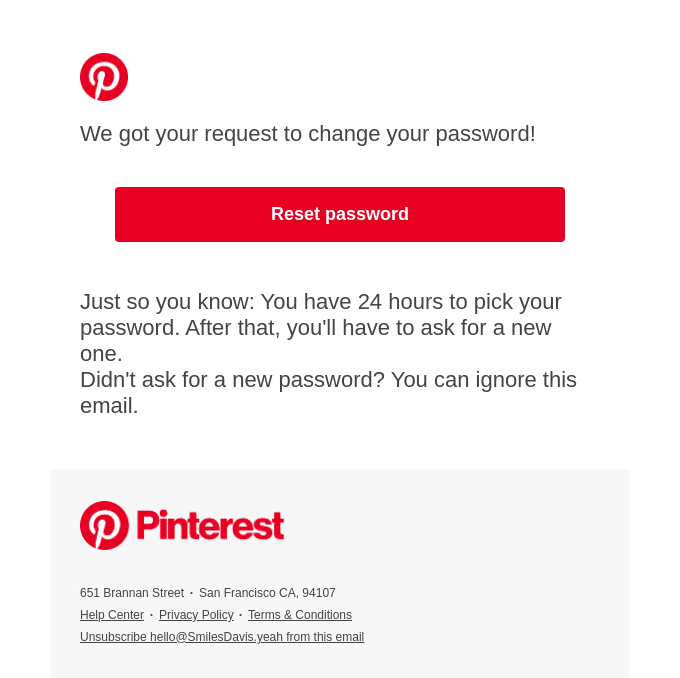
The most disciplined of the five. Logo, one line of explanation, one red Reset password button, and nothing else competing.
Underneath, it states the 24-hour window and adds “Didn’t ask for a new password? You can ignore this email.” That’s the expiry and the reassurance handled in two sentences.
Grubhub: “Let’s get you a fresh password”
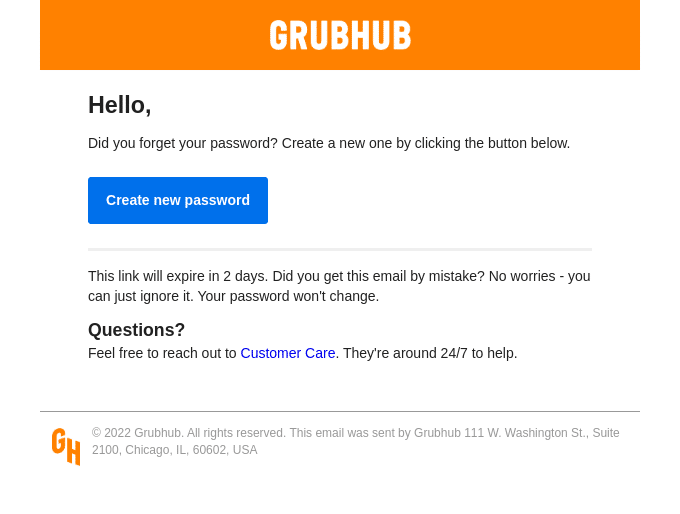
Short and practical. One Create new password button, and it states the expiry explicitly: the link expires in 2 days.
It’s the only one of the five with a dedicated Questions? section pointing at Customer Care, and it notes the team is available 24/7. If the link fails, the user has somewhere to go.
Outdoorsy: “Reset your password with Outdoorsy”

Warm without being chatty. “Forgot your password? No problem, it happens to everyone!” acknowledges the user’s situation in one line.
What sets it apart is a help section headed “Real people. Here to help.” with an actual phone number for a Customer Success rep. For a marketplace handling bookings and payments, a human on the end of a phone is the right call.
Common Mistakes to Avoid
Sending a password instead of a link. Any password sitting in an inbox is a password in plaintext storage that you don’t control.
Looking like phishing. A mismatched sender domain, a shortened link, or a design that doesn’t match your product all push users to delete the email instead of clicking it. Authenticate your sending domain and link to your real URL.
Burying the button. If the user has to scroll past a header, a hero image, and a paragraph of brand voice, the email is too long.
Letting it go out through a general-purpose mail setup. Reset emails are time-sensitive. Anything that batches, queues, or throttles them is a problem.
How to Send Password Reset Emails With SendLayer
Everything above assumes the email actually arrives, which is a deliverability question rather than a design one.
Reset emails go out one at a time, need to land in seconds, and have to reach the inbox rather than the spam folder. That’s a different job from bulk marketing mail, and it’s what a dedicated transactional email service is built for.
SendLayer handles domain authentication for you, delivers over SMTP or API, and logs every send so you can prove whether a reset email left and what happened to it. When a user says they never got the email, the log answers it.
If you’re building the flow yourself, the framework guides linked at the end of this post walk through the implementation.
Password Reset Email Checklist
Nineteen checks before you ship, across content, security, and delivery.

Content
- Recognizable sender name
- Literal subject line
- Reset URL as plain text too
- Expiry window stated
- “You didn’t request this” line
- Support contact
Security
- Single-use token that expires
- Token hashed in the database
- Other sessions invalidated
- Reset requests rate-limited
- No password anywhere in the email
- Account existence never revealed
Delivery and access
- Sending domain authenticated
- HTML and plain-text versions
- Alt text on every image
- Body text 16px or larger
- Tested on mobile
- Tested with images blocked
Frequently Asked Questions
How do you write a password reset email?
State what happened, give one clear button to reset, say when the link expires, and tell the user they can ignore the email if they didn’t request it. Add a support contact. Keep the whole thing under about 80 words.
Why did I just get a password reset email I didn’t request?
Usually someone typed your address by mistake on a login form. Occasionally it means someone is trying your address deliberately. Either way, don’t click the link. Ignore the email and your password stays as it is. If it keeps happening, change your password from inside your account and turn on two-factor authentication.
How long should a password reset link last?
Between one and 24 hours for most products. Shorter is safer, and anything past 48 hours is too long. Whatever you choose, state it in the email and make the token single-use.
Should a password reset email include the user’s password?
No. Never send a password in an email, including a temporary one. Send a time-limited link and let the user set the password themselves.
What should I write to ask an admin to reset my password?
Keep it short and make yourself identifiable. Give the account email or username, say which system you’re locked out of, and confirm you’re the account holder. Never include your old password in the request.
Why didn’t my password reset email arrive?
Check the spam folder first, then check whether your sending domain is authenticated with SPF, DKIM, and DMARC. Unauthenticated reset emails are routinely filtered. If the email left your system but never arrived, your sending platform’s logs will show whether it was accepted, deferred, or bounced.
That’s it! Now you know best practices for password reset emails
Next, want a step-by-step guide to implementing resets in your own app? Our tutorials cover each framework:
