


Email security matters more than it used to, and not because the threats got cleverer. It’s because the cost of getting it wrong went up.
I spend most of my time on deliverability here, making sure messages land in inboxes. But protecting email from unauthorized access turns out to be the same job from a different angle. Inbox providers trust domains that are locked down, and they distrust domains that aren’t.
I’ve watched a small business lose customer trust it spent years building, all from a single spoofed email. That’s the part people underestimate. A breach doesn’t just cost you data. It costs you the channel.
Here are the ten practices that actually move the needle, in the order I’d tackle them.
- What Is Email Security?
- The Email Threats You’re Defending Against
- 10 Email Security Best Practices
- 1. Use a Password Manager and Turn On 2FA
- 2. Patch Your Software and Devices
- 3. Set Up SPF, DKIM and DMARC
- 4. Move DMARC to Enforcement
- 5. Encrypt Messages in Transit
- 6. Filter Attachments and Links
- 7. Control Who Can Send as Your Domain
- 8. Train Your Team, Then Test Them
- 9. Back Up Mail and Plan for the Worst
- 10. Monitor and Audit Continuously
- Email Security Checklist
- How SendLayer Helps
- Frequently Asked Questions
What Is Email Security?
Email security is the set of practices and controls that stop attackers from reading, altering, or sending email as you.
It covers three separate jobs, and most advice blurs them together:
- Locking down your accounts, so nobody can log in as you. Passwords, 2FA, access control.
- Locking down your domain, so nobody can send as you. SPF, DKIM, DMARC, and enforcement.
- Locking down the messages, so nobody can read or alter them in transit. TLS and MTA-STS.
Get all three right and you’ve covered the ways email actually gets compromised. Skip one and the other two won’t save you. Plenty of organizations have flawless 2FA and a DMARC record sitting at p=none. That setting tells the world to do nothing about mail forging their domain.

The Email Threats You’re Defending Against
Email scams stopped being easy to spot a long time ago. The “Nigerian Prince” era is over. Now attackers use your real vendor names, your real invoice formats, and AI-written copy that reads like a colleague.
Here’s what you’re actually up against, and what stops each one.
| Threat | How it works | What stops it |
|---|---|---|
| Phishing | Mass emails imitating a brand to harvest credentials | Filtering, 2FA, training |
| Spear phishing / BEC | A targeted message impersonating a real executive or supplier, usually about a payment | Out-of-band verification, DMARC enforcement, payment controls |
| Domain spoofing | Forging your domain in the From: header so your customers get scammed | SPF, DKIM, DMARC at p=reject |
| Malware and weaponized attachments | An invoice or shipping notice carrying a payload | Attachment scanning, macro blocking, patching |
| Credential stuffing | Reused passwords from an unrelated breach tried against your mailbox | Unique passwords, 2FA, login alerts |
| Account takeover | An attacker inside a real mailbox, sending from it | 2FA, session monitoring, least privilege |
The money is in the targeted ones. The FBI’s 2025 Internet Crime Report logged 1,008,597 complaints and $20.877 billion in reported losses, up 26% in a year. Business email compromise alone accounted for $3.05 billion, the second-costliest category after investment fraud.
BEC has no malware and no bad link. It’s one convincing email about a bank detail change. That’s why authentication matters more than any filter you can buy.

10 Email Security Best Practices
Work down this list in order. The first four cover most real-world compromise, and none of them takes long.
1. Use a Password Manager and Turn On 2FA
Do you reuse the same password in a few places? Guilty, historically. The fix is a password manager rather than a better memory. 1Password and Bitwarden both generate and store unique passwords per account.
Then turn on two-factor authentication everywhere it’s offered. 2FA means a stolen password isn’t enough on its own.
Not all second factors are equal, though. An authenticator app or a hardware key beats SMS, because SMS codes can be intercepted through SIM swapping. If you only harden one account, make it the mailbox that can reset everything else.

2. Patch Your Software and Devices
This is the practice everyone skips, and the data no longer lets us treat it as housekeeping.
Verizon’s 2026 Data Breach Investigations Report found that 31% of breaches now start with a software vulnerability. That’s overtaken stolen passwords as the most common way in. Ransomware shows up in 48% of breaches.
So email clients, plugins, mail servers and operating systems all need to stay current. Turn on automatic updates where you can. Where you can’t, put patching on a calendar rather than leaving it to whoever notices first.
3. Set Up SPF, DKIM and DMARC
These three records prove your mail is really from you. They’re the foundation everything else sits on.
- SPF lists the servers allowed to send for your domain.
- DKIM signs each message so tampering is detectable.
- DMARC tells receivers what to do when SPF and DKIM don’t line up, and sends you reports.
This stopped being optional. Since February 2024, Google and Yahoo have required SPF, DKIM and DMARC from anyone sending 5,000+ messages a day to their users. Microsoft added the same bar for Outlook, Hotmail and Live addresses in May 2025.
One trap worth knowing: SPF allows a maximum of 10 DNS lookups per evaluation. Go over it and you get a permerror, which fails the check for every message you send. If you’re close to the limit, read up on SPF flattening and its trade-offs before you touch the record.
Our guide to authentication protocols walks through each record, and Gmail and Yahoo now refusing unauthenticated email covers what happens when they’re missing.
4. Move DMARC to Enforcement
Publishing a DMARC record and leaving it at p=none is the most common half-finished job in email security. p=none means “monitor and tell me,” so a forged message from your domain still gets delivered.
This is not a rare mistake. When we analyzed the email security protocols of 187,482 organizations, 52% of company domains that had DMARC at all were sitting at p=none. Among Fortune 500 companies with a DMARC record, 40% were. So most domains that look protected aren’t.
The policy ladder has three rungs:
p=nonecollects reports and changes nothing. A starting point, not a destination.p=quarantinesends failing mail to spam.p=rejectrefuses it outright. This is the one that actually protects your customers.
Move up deliberately. Sit at p=none long enough to read the reports and find every legitimate sender. That includes the ones you forgot about: your help desk, your invoicing tool, your marketing platform. Fix their alignment, then go to p=quarantine, then p=reject.
Enforcement also unlocks something useful. BIMI, which puts your logo next to your messages in supporting inboxes, requires DMARC at p=quarantine or p=reject. You can’t get it while you’re at p=none.

5. Encrypt Messages in Transit
Almost all email is encrypted in transit already, using TLS on ports 587 or 465. The problem is that standard TLS for email is opportunistic: if the receiving server doesn’t offer encryption, most senders quietly fall back to plaintext. An attacker who can strip the TLS handshake gets to read everything.
Two DNS records close that gap:
- MTA-STS publishes a policy saying your domain requires TLS, so senders refuse to downgrade.
- TLS-RPT sends you reports when a delivery fails its TLS check.
You’ll also see S/MIME and PGP recommended for true end-to-end encryption. They work, but both need key management on the recipient’s side, which makes them impractical for automated transactional mail. For most senders, TLS plus MTA-STS is the realistic answer.
6. Filter Attachments and Links
Most malware still arrives as an attachment that looks like paperwork. An invoice, a shipping label, a resume.
Block executable attachments at the gateway, and disable macros in Office documents by default. Turn on link scanning so URLs get checked at the moment someone clicks, not just on arrival. Attackers often swap the destination after delivery.
Sandboxing attachments catches what signature-based scanning misses. Most hosted mail providers include some version of this, but it’s frequently off by default. It helps to know how AI spam filters work so you can tell what your gateway is and isn’t catching.
7. Control Who Can Send as Your Domain
Every integration you give sending rights to is another way into your domain’s reputation. The marketing platform, the CRM, the ticketing system, the deploy script somebody wrote in 2021.
Audit that list. Remove what you no longer use. Give each service its own API key rather than sharing one, so you can revoke a single integration without breaking the rest. Rotate keys when people leave.
The same logic applies to mailboxes. Shared inboxes and generic logins make it impossible to tell who sent what, which is exactly the situation you don’t want during an incident.
8. Train Your Team, Then Test Them
One person clicking one link is still how most incidents start. Regular reminders about phishing, spoofed addresses and unexpected attachments genuinely help.
Reminders alone aren’t enough, though. Run simulated phishing campaigns so people practise on something harmless, and so you find out which teams need more support. Report the results as a team metric, never as a name-and-shame.
Build one habit above all others: any request to change bank details, payment terms or payroll gets verified on a different channel. A phone call to a known number defeats nearly every BEC attempt, no matter how convincing the email.
9. Back Up Mail and Plan for the Worst
Even a well-secured system can be compromised, so back up mail and important documents on a schedule.
Then write down what happens if it goes wrong. Who resets credentials, who checks the DNS records, how you reach customers if your own email is the compromised channel. A plan written calmly in advance is worth far more than one improvised during an incident.
Test the restore occasionally. An untested backup is a guess.
10. Monitor and Audit Continuously
Security settings drift. Records get edited during an unrelated migration and nobody notices for months.
Read your DMARC reports. They tell you exactly who’s sending as your domain, including the people who shouldn’t be. Ours on how to read a DMARC report covers the XML.
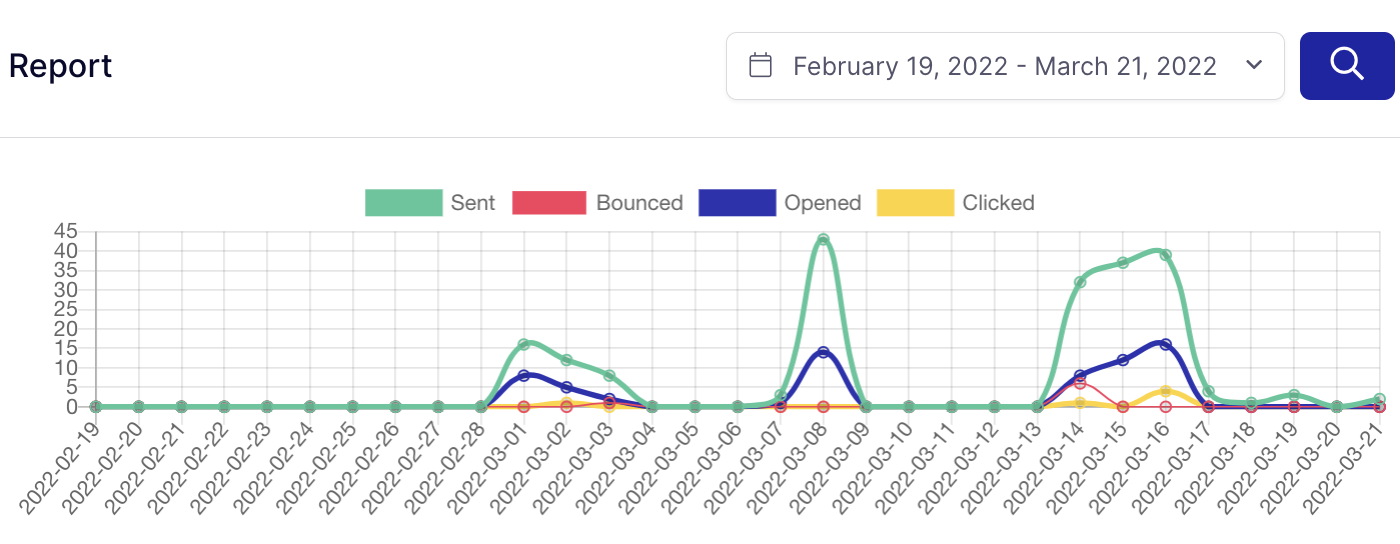
Watch your sending metrics too. A sudden spike in bounces or spam complaints is often the first visible sign of trouble. It can mean a spoofing campaign against your domain, or a misconfiguration of your own.
Then re-check the basics on a schedule: SPF, DKIM and DMARC records, TLS settings, user permissions, and which integrations still have sending rights.
Email Security Checklist
Run through this quarterly.
Accounts
- Password manager in use, no reused passwords
- 2FA on every mailbox, app or hardware key rather than SMS
- Admin access limited to people who need it
- Departed staff removed, their keys rotated
Domain
- SPF record published, under 10 DNS lookups
- DKIM signing enabled on every sending service
- DMARC published and moved past
p=none - DMARC reports actually read, not just collected
- Non-sending domains locked with
v=spf1 -all
Messages
- TLS enforced, not opportunistic
- MTA-STS and TLS-RPT records published
- Executable attachments blocked, macros disabled
- Link scanning enabled at click time
People and Process
- Phishing training refreshed within the year
- Simulated phishing run at least once
- Out-of-band verification required for payment changes
- Incident plan written down and reachable offline
- Backups running, and a restore tested
How SendLayer Helps
A good sending platform won’t cover your accounts or your team’s habits, but it does own the domain and message layers.
SendLayer walks you through verifying your domain and publishing SPF and DKIM records correctly, which is where most authentication problems start. Sends go over TLS, and each integration gets its own API key, so you can revoke one without touching the others.
You also get delivery logs and metrics, which double as an early-warning system. A sudden jump in failed sends can mean somebody’s spoofing your domain, or that a record changed when it shouldn’t have.
Frequently Asked Questions
These are answers to some of the top questions we see about improving email security.
How do I secure my email?
Start with the account: a password manager and 2FA using an authenticator app rather than SMS. Then the domain: publish SPF, DKIM, and DMARC, and move DMARC past p=none to p=quarantine or p=reject. Then the messages: enforce TLS with MTA-STS, block executable attachments, and scan links at click time. Those three layers cover how email actually gets compromised.
Can I tell if my email has been hacked?
Look for sent messages you didn’t write, mail rules or forwarding addresses you didn’t create, password reset emails you didn’t request, and unfamiliar logins in your account’s security history. On the domain side, DMARC reports will show messages sent from your domain by servers you don’t recognize. A sudden spike in bounces or spam complaints is often the first visible sign.
Is email encrypted by default?
In transit, usually yes, over TLS. But standard email TLS is opportunistic, so if the receiving server doesn’t support it, most senders fall back to plaintext rather than fail. Publishing an MTA-STS policy tells senders to require TLS instead of downgrading. Email is not end-to-end encrypted by default, and that needs S/MIME or PGP.
Does DMARC stop spoofing on its own?
Only at enforcement. A DMARC record set to p=none monitors and reports but changes nothing, so forged mail still arrives. p=quarantine diverts it to spam and p=reject refuses it. Most domains that “have DMARC” are still at p=none, which is why spoofing keeps working.
How often should I review my email security?
Read DMARC reports as they arrive, since they surface problems you can’t otherwise see. Audit accounts, keys, and records quarterly, and any time someone with access leaves. Refresh phishing training annually, with at least one simulation in between.
Now you know how to improve your email security
Next, want to protect your domain reputation as well as your domain? Read our guide to email suppression lists.
Ready to send your emails the fast and reliable way? Get started today with the most user-friendly SMTP email delivery service. SendLayer Business includes 5,000 emails a month with premium support.
