


A suppression list is a list of email addresses your sending platform will never deliver to. Addresses land on it when they bounce, unsubscribe, or report your messages as spam.
Sending to them again damages your sender reputation. A suppression list stops that automatically, without you having to remember who to skip.
In this post, I’ll explain exactly what a suppression list is, how it works, and why it’s essential for maintaining a good sender reputation.
- What Goes on a Suppression List?
- How Does a Suppression List Work?
- Suppression List vs. Unsubscribe List vs. Blocklist
- Why Suppression Lists Matter
- Suppression Lists and Email Law
- Suppression Lists for Transactional Email
- How to Manage Your Suppression List in SendLayer
- When Should You Remove an Address?
- Suppression List Best Practices
- Frequently Asked Questions
What Is a Suppression List?
An email suppression list is a record of addresses you’ve blocked yourself from emailing. Your sending platform checks every recipient against it before sending. If the address is on the list, the message never goes out.
Addresses usually get there for one of three reasons. They bounced permanently, the person opted out, or the person marked your email as spam.
Think of it as the opposite of a mailing list. Your mailing list is who you’re allowed to contact. Your suppression list is who you aren’t.
That difference matters. Deleting a contact from your database doesn’t stop future sends, because a re-import from your CRM or a signup form adds them straight back. A suppression entry survives re-imports, so the block sticks.
What Goes on a Suppression List?
Five kinds of addresses typically end up suppressed.

- Hard bounces are permanent failures. The mailbox doesn’t exist, or the address was mistyped at signup. Retrying is pointless, and mailbox providers read repeat attempts as a sign you don’t clean your list.
- Repeated soft bounces start as temporary problems, like a full mailbox or a server that’s down. One is normal. A mailbox that keeps soft-bouncing for weeks is usually abandoned.
- Unsubscribes are suppressed the moment someone clicks your opt-out link. This is the category with legal weight behind it.
- Invalid addresses and spam traps include malformed addresses and addresses planted by providers purely to catch senders using scraped lists. Hitting a trap can get your domain blocklisted outright.
How Does a Suppression List Work?
Every time you send, your platform compares each recipient against your suppression list. Matches get dropped before the message leaves. The rest go out normally, and you don’t get an error.

Addresses get added two ways. Automatically, when your platform detects a hard bounce, an unsubscribe click, or a spam complaint from a feedback loop. Bounce codes come straight from the receiving mail server, so none of this needs to be configured.
Manually, when you add an address yourself. That covers a customer who emails support instead of clicking unsubscribe, a GDPR deletion request, or a test address you want kept out of a send.
SendLayer adds an address automatically on a hard bounce, when a recipient unsubscribes, or when someone files a spam complaint.
In SendLayer your suppression list is specific to each authorized domain, so if you send from two domains, each keeps its own list. Suppression also isn’t global across senders. An address suppressed on your account can still receive mail from other companies.
Suppression List vs. Unsubscribe List vs. Blocklist
These terms get used interchangeably, and they shouldn’t be.
| Term | What it is | Who controls it |
|---|---|---|
| Suppression list | Every address you won’t send to, for any reason | You |
| Unsubscribe list | Only the people who opted out. A subset of your suppression list | You, driven by recipients |
| Exclusion list | Addresses left out of one specific campaign, for targeting rather than deliverability | You, per campaign |
| Blocklist (blacklist) | A public database of sending IPs and domains flagged for spam | Third parties like Spamhaus |
An unsubscribe list is narrower than a suppression list. Every unsubscribe belongs on your suppression list, but plenty of suppressed addresses never unsubscribed. They bounced.
An exclusion list is temporary and about targeting. You might leave existing customers out of a new-customer promo, and those contacts stay perfectly good. Suppression protects deliverability and is permanent by default.
A blocklist isn’t yours at all. Your suppression list is a tool you use to stay off blocklists.
Why Suppression Lists Matter
Three reasons, and the first carries the most weight.
They protect your sender reputation
Gmail and Yahoo score you on how recipients react to your mail. Bounces and complaints push that score down, and your domain reputation with it.
The thresholds are public. Google asks bulk senders to keep spam rates in Postmaster Tools below 0.3%, and recommends staying under 0.10%. Three complaints per thousand messages is enough to cause trouble.

Recovery is slow once you slip, and it can mean warming up your domain all over again.
They keep you compliant
When someone opts out, you’re legally required to stop. Suppression makes that reliable instead of dependent on someone remembering.
They cut wasted spend
Most platforms bill on messages sent, not delivered. On a list of 50,000 with 3% dead addresses, that’s 1,500 wasted sends every campaign.
Suppression Lists and Email Law
Suppression isn’t only a deliverability practice. Several laws depend on it.
CAN-SPAM in the US requires you to honor an opt-out within 10 business days, and your opt-out mechanism has to keep working for at least 30 days after you send. The FTC’s compliance guide covers the full rules.
GDPR gives people in the EU the right to have their data erased. Delete a contact record without a suppression entry and a later import quietly undoes the request.
CASL in Canada is stricter because it requires consent before you send at all. CCPA grants Californians similar deletion and opt-out rights. Our guide to email data privacy goes into greater detail on what these rules require of senders.
Google’s bulk sender rules aren’t law but function like it. Senders above 5,000 messages a day need one-click unsubscribe, processed automatically.
Suppression Lists for Transactional Email
Suppression gets discussed almost entirely in a marketing context. It matters just as much for transactional email, and the stakes differ.
Password resets, receipts, and security alerts are messages users are actively waiting for. If your domain reputation slips, these are the ones that land in spam.
Here’s the tension. A suppressed address means a real user no longer receives password resets. That’s a support problem, not just a deliverability one.
So handle the two cases differently. A hard bounce on transactional mail usually means the account holder’s address is dead. Suppress it, then surface it in your app so the user is prompted to update it. Silently suppressing is how people end up locked out of their own accounts.
Spam complaints on transactional mail are worth investigating rather than just logging. If people mark your receipts as spam, something upstream is wrong: too many messages, an unclear sender name, or content that reads like marketing.
One trap to avoid. Transactional messages don’t legally need an unsubscribe link, but adding promotional content changes that. A receipt with a discount code attached can count as marketing.
How to Manage Your Suppression List in SendLayer
Automatic suppression covers most of what you need. When you want to look at the list yourself, it’s all on one page.
Log in to your SendLayer dashboard and click Suppressions in the left-hand menu. You’ll see every suppressed address for the domain you’re working in, with the reason it was added. Because the list is per-domain, check you’re on the right authorized domain first.
To find one address, use the search bar at the top right. That’s the quickest way to answer “why didn’t this person get my email?”
To add addresses manually:
- Click Add Email Addresses To Suppression List.
- Enter the addresses, one per line.
- Click Import.
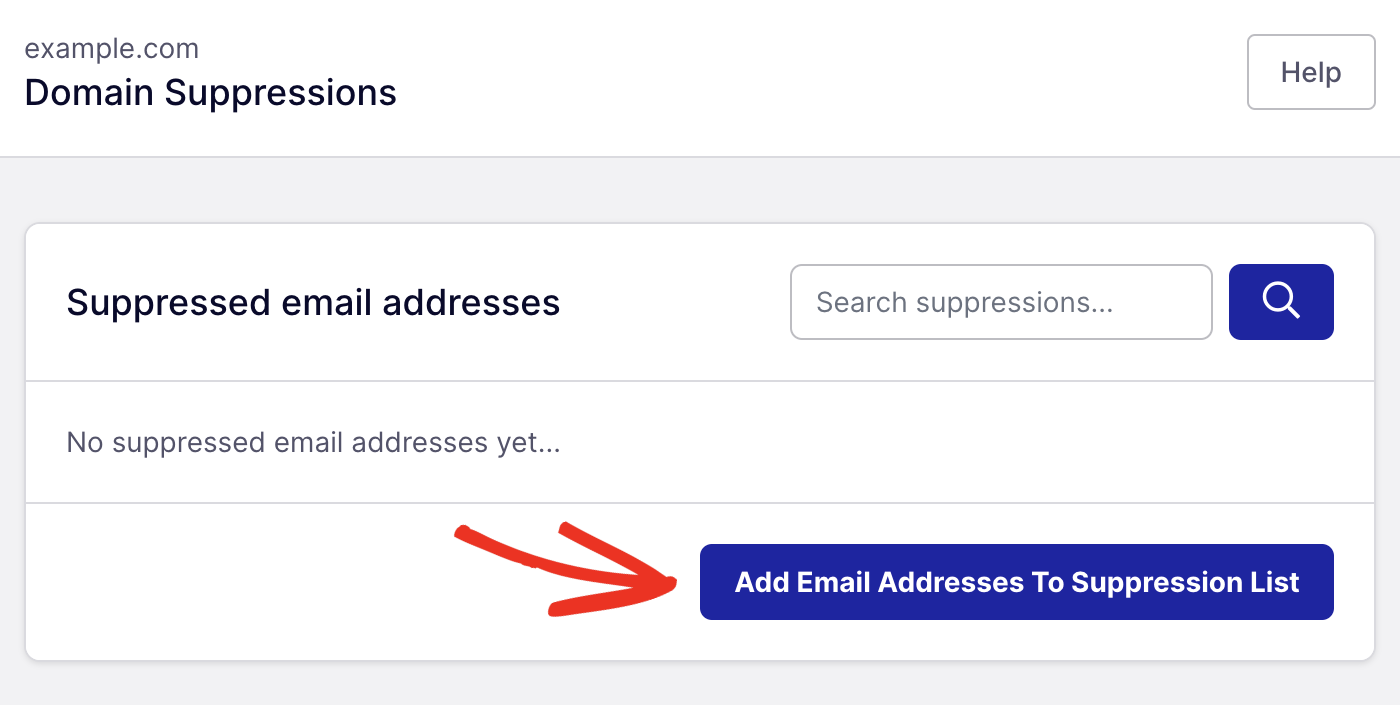
To remove an address, find it and click the trash icon.
Before removing anything, check your email logs for why it was suppressed. A hard bounce and an accidental spam complaint call for different decisions.
Full details are in our guide to managing your suppression list.
When Should You Remove an Address?
Most of the time, don’t. Leave entries in place by default.
There are a few fair exceptions. A hard bounce from a typo you can verify, where you have the correct address. A confirmed re-subscribe through your own form. A mailbox suppressed for soft bounces that works again after a server fix. Or a direct support request to be re-enabled, which counts as consent. Log where the new consent came from in each case.
Never remove a spam complaint. That address already told a mailbox provider your mail was unwanted. Let them re-subscribe through your form if they want back in.
And never bulk-clear your list to boost list size. Re-sending to all of them at once is the fastest route to a blocklist.
Suppression List Best Practices
- Verify addresses at signup. Real-time validation catches typos and disposable addresses before they bounce. Nothing downstream beats stopping the problem here.
- Watch bounce and complaint rates weekly. A spike usually traces to one bad import. Catching it in week one limits the damage to a single send.
- Leave automatic suppression on. Turning it off to protect list size trades deliverability for a vanity number.
- Keep suppression synced across systems. If your CRM, app, and sending platform each hold contacts, an opt-out in one has to reach the others. Test it by unsubscribing yourself.
- Check the suppression list first when someone reports a missing email. It’s usually the answer, and it takes seconds.
- Don’t buy lists. They’re full of dead addresses and spam traps.
Frequently Asked Questions
What does a suppression list mean?
It means a list of email addresses your platform is blocked from sending to. Addresses are added when they bounce permanently, when someone unsubscribes, or when someone reports your email as spam.
How does an email get on a suppression list?
Two ways. Automatically, when your platform detects a hard bounce, an unsubscribe click, or a spam complaint reported through a feedback loop. Or manually, when you add an address yourself.
What is the difference between a suppression list and an exclusion list?
A suppression list is permanent and protects deliverability. An exclusion list is temporary and about targeting: it leaves specific contacts out of one campaign, and those contacts stay perfectly valid for other sends.
Why do some emails go to the suppression list in Amazon SES?
SES suppresses addresses on hard bounces and spam complaints by default. It also keeps a global suppression list shared across all SES accounts, so an address can be suppressed for you because a different SES sender hit a hard bounce on it.
How long should addresses stay suppressed?
Indefinitely by default. Hard bounces and spam complaints should never be removed. Only restore an address when you have fresh, documented consent.
That’s it! Now you know what an email suppression list is.
Next, want to understand the different ways to send email? Check out our guide on SMTP vs API for a full comparison.
