


An invoice email is the message that decides when you get paid. Most people rewrite it from scratch every time. That’s why a reusable invoice email template is worth keeping.
This is especially useful for freelancers and small businesses that send invoices regularly but don’t want to rewrite the same message every month.
The obvious version attaches a PDF and says, “Please find the invoice attached to this email.” It works, but it often reads like an afterthought and gives the client very little context about the amount, due date, or next step.
Below are 7 invoice email templates you can copy, from a first invoice to a final notice.
You’ll also learn how to send them, automate the reminders, and stay out of the spam folder. Let’s get started.
What is an invoice email?
If you’re looking for the invoice email meaning, it’s simply the message you send to deliver an invoice and request payment. It does 3 jobs at once.
- It delivers the invoice, as an attachment or a link.
- It states the terms: what’s owed, by when, and how to pay.
- It creates a written record of when you asked.
That last job matters more than people expect. If payment goes late, your email trail proves what you sent and when.
Is an invoice email the same as an invoice?
No. The invoice is the document with the line items, totals, and tax. The invoice email is the message that carries it.
Search for an invoice template and you’ll get the document. Everything here is about the email around it. That’s the part clients actually read.
What should an invoice email include?
Include 8 things in every invoice email. Missing any of them can give your client a reason to delay.
| Element | Why it matters | Example |
|---|---|---|
| Invoice number | Lets accounts payable file and track it | Invoice 1043 |
| Amount due | Answers the first question they’ll ask | $1,250.00 |
| Due date | Sets the deadline in writing | Due October 1, 2026 |
| What it covers | Stops “what is this for?” replies | Website redesign, September |
| The invoice itself | A PDF attachment, a link, or both | Invoice-1043-AcmeCo.pdf |
| How to pay | Removes the last bit of friction | Bank transfer or card link |
| Payment terms | Backs you up if payment slips | Net 30, 2% late fee after 30 days |
| A contact for questions | Keeps a query from becoming a delay | Reply to this email or call |

Pro Tip: Name the attachment so it stands out in a crowded downloads folder. Invoice-1043-AcmeCo.pdf beats invoice_final_v2.pdf every time.
What is a good subject line for an invoice email?
Put your business name, the invoice number, and the due date in the subject line. Accounts payable teams search their inbox by those words.
New invoices:
- Invoice 1043 from Studio Nine, due October 1
- Studio Nine: Invoice 1043 for $1,250.00
- Invoice 1043 for the September website work
Reminders before the due date:
- Reminder: Invoice 1043 is due Friday
- Invoice 1043 from Studio Nine, due in 3 days
- Quick reminder about Invoice 1043 ($1,250.00)
Overdue invoices:
- Invoice 1043 is now 14 days past due
- Second notice: Invoice 1043, due September 15
- Final notice: Invoice 1043 from Studio Nine
Keep the number in every follow-up. It ties the whole thread to one payment.
What do the best invoice email templates look like?
The best invoice emails are short, specific, and easy to act on. These simple invoice email templates cover the most common stages of the payment process, from the first invoice to the final reminder.
Copy them as-is, then swap the bracketed parts for your details. If you also send order confirmations, our order confirmation email templates follow the same structure.
I use them as a ladder, and I never skip template 4. The reminder sent 3 days early can prevent unnecessary follow-up.
1. Standard invoice email example
Use this for a new invoice to a client who’s expecting it.
Subject: Invoice 1043 from [Your business], due [date]

Hi [Client name],

Thanks for your business. Invoice 1043 for [$amount] is attached, covering [work or period].

It's due on [date]. You can pay by [payment method], or use the link below:

[Payment link]

Any questions about the invoice, just reply here and I'll sort it out.

Thanks,
[Your name]
[Your business, phone]
Tone: warm and matter-of-fact. You’re not asking for a favor.

2. Recurring or retainer invoice email example
Keep recurring invoices identical each month. Predictable emails get approved faster.
Subject: Invoice 1044 from [Your business], [month] retainer

Hi [Client name],

Invoice 1044 for [$amount] is attached, covering your [month] retainer.

Same terms as always: due [date], payable by [payment method].

Nothing needed from you beyond the usual approval. Thanks again for the ongoing work.

Best,
[Your name]
Tone: routine on purpose. Any surprise in a retainer invoice slows down approval.
3. Invoice email after completing a project
Send this the same day you hand over the work, while it’s fresh.
Subject: [Project name] is complete, Invoice 1045 attached

Hi [Client name],

[Project name] is finished and live. Here's a quick recap of what was delivered:

- [Deliverable 1]
- [Deliverable 2]
- [Deliverable 3]

Invoice 1045 for [$amount] is attached, due [date]. You can pay by [payment method] or use this link:

[Payment link]

It's been a pleasure working on this. Happy to help with [next logical project] whenever you're ready.

Thanks,
[Your name]
Tone: proud, brief, and forward-looking. The recap reminds them what they’re paying for.
4. Payment reminder before the due date
Send a friendly nudge 3 days before the due date. It costs nothing and prevents most late payments.
Subject: Reminder: Invoice 1043 is due [date]

Hi [Client name],

Quick reminder that Invoice 1043 for [$amount] is due on [date]. I've attached it again so it's easy to find.

[Payment link]

If it's already scheduled, please ignore this. If anything's holding it up, let me know and I'll help.

Thanks,
[Your name]
Tone: helpful, never accusing. Nothing is late yet.
5. Overdue invoice email
State the facts, then ask for a payment date. Keep emotion out of it.
Subject: Invoice 1043 is now [N] days past due

Hi [Client name],

Invoice 1043 for [$amount] was due on [date] and is now [N] days past due. I've attached a copy.

Could you confirm when it will be paid? If it's stuck in approvals, tell me who to follow up with and I'll take it from there.

[Payment link]

Thanks,
[Your name]
Tone: firm and cooperative. Asking for a date gets a better reply than asking for payment.
6. Past-due invoice email with a late fee
Only mention a late fee if your contract or original terms allow it. Quote the exact clause.
Subject: Second notice: Invoice 1043, [N] days past due

Hi [Client name],

Invoice 1043 for [$amount] is now [N] days past due. Under the payment terms on the invoice, a [N]% late fee of [$amount] applies after [N] days.

The updated total is [$amount], attached.

If you can settle the outstanding balance by [date], I’m happy to waive the late fee.

[Payment link]

Thanks,
[Your name]
Tone: businesslike with an exit. Offering to drop the fee often gets you paid that week.
7. Final notice for an unpaid invoice
A final notice names one deadline and one consequence. Nothing more.
Subject: Final notice: Invoice 1043 from [Your business]

Hi [Client name],

Invoice 1043 for [$amount] was due on [date] and remains unpaid after [N] reminders.

Please pay in full by [date]. If I don't hear from you by then, I'll [pause work / hand this to a collections service / begin the process set out in our contract].

I'd much rather resolve it directly. Call me on [phone] today if there's a problem I can help with.

[Payment link]

Regards,
[Your name]
Tone: calm and final. Say only what you’re genuinely prepared to do.
How do you send an invoice through email?
Attach the invoice as a PDF and include a payment link in the body. The PDF is the record, and the link is the action.
Send the invoice to the client’s designated billing address or contact. If they use an accounts-payable address, send it there and copy your main contact when appropriate.
Should you attach the invoice as a PDF or link to it?
When practical, include both. A PDF gives your client a file they can store or pass through an approval workflow, while a payment link makes it easier to pay immediately.
- PDF attachment: best for accounting records and approval workflows.
- Payment link: best for getting paid quickly, especially by card.
- Hosted invoice page: useful when the invoice changes, since the link stays current.
Note: Keep the whole email under 10 MB, attachments included. That’s the per email limit on SendLayer, and most inboxes reject anything much larger.
When is the best time to send an invoice email?
Send it as soon as the work is approved or the billing period closes. Every day you wait is a day added to the payment clock.
Two timing habits that have helped me when dealing with clients:
- For manual invoices, I prefer Tuesday or Wednesday mornings, when they’re less likely to get buried in a Monday backlog or Friday wind-down.
- Avoid Friday afternoons, when your invoice sits until Monday.
How to automate invoice emails from your app
You can automate invoice emails by building each message from your invoice data. Send it through an email API or SMTP. You’ll want this once you send more than a handful of invoices a month.
Manual sending also breaks quietly. You might forget a reminder, the address might have a typo, or your email host might silently throttle you.
Let me show you how to automate the process using an email API or SMTP.
Prerequisites
To follow along, you’ll need:
- An SMTP or email API provider. I’ll use SendLayer because it gives you access to both sending options
- Node.js or Python, if you’re sending from your own code
Important: If you use SendLayer, you’ll need to authorize your sending domain. Unauthenticated emails are more likely to be rejected or routed to spam, particularly by major mailbox providers.
Step 1: Build an HTML invoice email template
If you need an invoice email template in HTML, start with a table-based layout and inline styles for the most consistent rendering across email clients.
<table role="presentation" width="100%" cellpadding="0" cellspacing="0" style="background:#f4f4f5;padding:24px 0;">
  <tr>
    <td align="center">
      <table role="presentation" width="600" cellpadding="0" cellspacing="0" style="background:#ffffff;border-radius:8px;font-family:Arial,Helvetica,sans-serif;color:#1f2937;">
        <tr>
          <td style="padding:24px 32px 8px;font-size:20px;font-weight:bold;">Invoice 1043</td>
        </tr>
        <tr>
          <td style="padding:0 32px 16px;font-size:15px;line-height:22px;">
            Hi Dana,<br>
            Thanks for your business. Invoice 1043 covers the September website work.
          </td>
        </tr>
        <tr>
          <td style="padding:0 32px 16px;font-size:15px;">
            <strong>Amount due:</strong> $1,250.00<br>
            <strong>Due date:</strong> October 1, 2026<br>
            <strong>Terms:</strong> Net 30
          </td>
        </tr>
        <tr>
          <td style="padding:8px 32px 32px;">
            <a href="https://pay.example.com/inv/1043"
               style="background:#2563eb;color:#ffffff;text-decoration:none;padding:12px 20px;border-radius:6px;font-size:15px;display:inline-block;">
              Pay invoice
            </a>
          </td>
        </tr>
      </table>
    </td>
  </tr>
</table>
Send a plain-text version alongside your HTML email. It improves accessibility and gives email clients a fallback when HTML can’t be rendered correctly.
Step 2: Send invoice emails with an email API
Pass your HTML, your recipient, and the PDF to the API in one call. Here it is in Node.js with the SendLayer SDK:
import { SendLayer } from 'sendlayer';

// Never hardcode the key. Read it from the environment.
const sendlayer = new SendLayer(process.env.SENDLAYER_API_KEY);

const invoice = {
  number: '1043',
  amount: '$1,250.00',
  dueDate: 'October 1, 2026',
  clientEmail: '[email protected]',
};

const response = await sendlayer.Emails.send({
  from: { name: 'Studio Nine Billing', email: '[email protected]' },
  to: invoice.clientEmail,
  subject: `Invoice ${invoice.number} from Studio Nine, due ${invoice.dueDate}`,
  html: renderInvoiceEmail(invoice), // the HTML template above
  text: `Invoice ${invoice.number} for ${invoice.amount} is due ${invoice.dueDate}.`,
  attachments: [
    {
      path: `./invoices/Invoice-${invoice.number}-AcmeCo.pdf`,
      type: 'application/pdf',
    },
  ],
});

console.log(response);
Be sure to pass your actual API key as an environment variable before running the code. To get your API key, log in to your SendLayer account.
Once you’re logged in, click the Settings menu and select the API Keys tab.
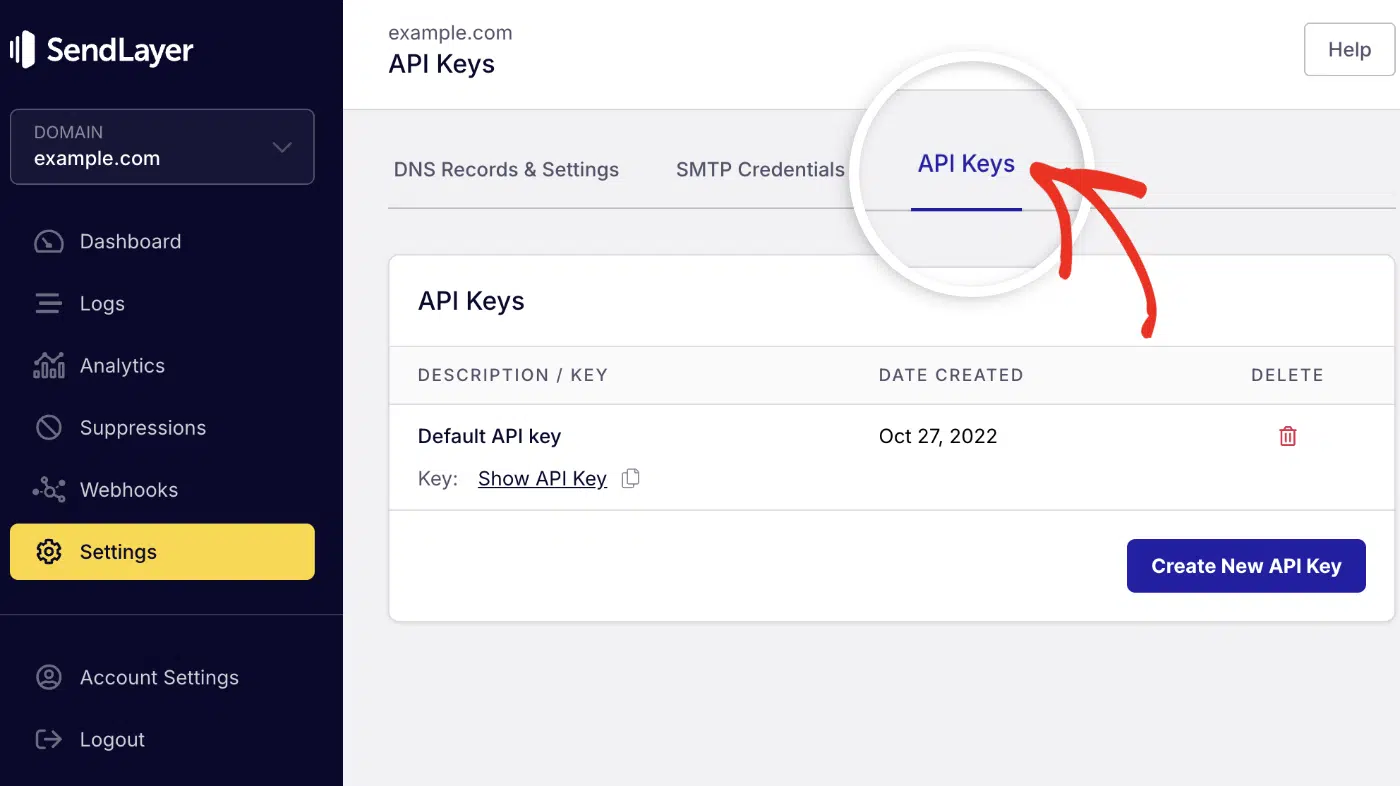
Then click the copy icon next to Default API key to copy it.

Note: For more details on sending emails in JavaScript, see our developer documentation.
If your app uses Python, here’s the equivalent using the SendLayer Python SDK:
import os
from sendlayer import SendLayer

sendlayer = SendLayer(os.environ["SENDLAYER_API_KEY"])

params = {
    "sender": {"name": "Studio Nine Billing", "email": "[email protected]"},
    "to": "[email protected]",
    "subject": "Invoice 1043 from Studio Nine, due October 1, 2026",
    "html": invoice_html,  # the HTML template above
    "text": "Invoice 1043 for $1,250.00 is due October 1, 2026.",
    "attachments": [
        {"path": "./invoices/Invoice-1043-AcmeCo.pdf", "type": "application/pdf"}
    ],
}

response = sendlayer.Emails.send(**params)
Note: The Python SDK uses sender, whereas the Node SDK uses from. Be careful not to mix them up when moving between the two SDKs. See our tutorial for more details on sending emails in Python.
Not writing code? Point your existing tool at SMTP instead. WooCommerce, QuickBooks, Xero, and most invoicing apps accept these settings:
| Setting | Value |
|---|---|
| SMTP host | smtp.sendlayer.net |
| Port | 587 for TLS, 465 for SSL |
| Username | your SendLayer SMTP user |
| Password | your SendLayer SMTP password |
| Encryption | TLS (recommended) |
Store the credentials as environment variables (SENDLAYER_USER and SENDLAYER_PASS) rather than in your code.
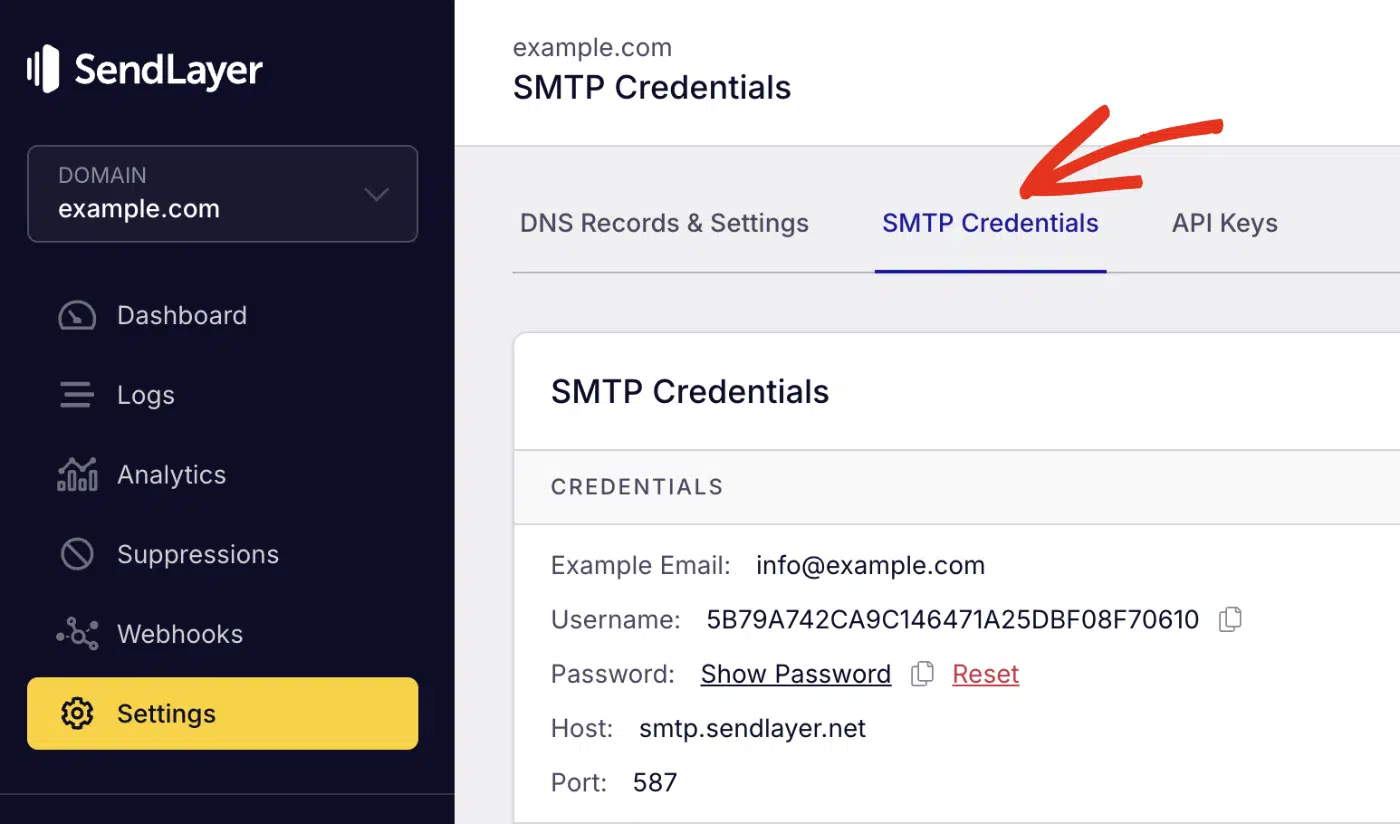
To retrieve your SMTP credentials, log in to your SendLayer account and select the Settings sidebar menu. Then select the SMTP Credentials tab.
How do you automate payment reminders?
Schedule reminders based on the due date, not the day you remember. A fixed ladder does the chasing for you.
Here’s a practical reminder schedule you can use as a starting point. Adjust the timing to match your payment terms, client relationships, and internal billing process.
| When | Tone | |
|---|---|---|
| 3 days before due | Template 4, pre-due reminder | Friendly |
| Due date | Template 4, reworded for today | Neutral |
| 7 days past due | Template 5, overdue notice | Firm |
| 14 days past due | Template 6, late fee notice | Businesslike |
| 30 days past due | Template 7, final notice | Final |

Run one job daily to find unpaid invoices and match them to the stage above. Stop the sequence as soon as payment clears. Log every send so nobody gets the same reminder twice.
Frequently Asked Questions
These are answers to some of the most common questions we receive about invoice emails.
How do you politely ask for payment in an email?
State the invoice number, the amount, and the due date, then ask for a payment date. Politeness comes from clarity, not from apologizing. Skip phrases like “sorry to bother you,” which make the request sound optional.
How many times should you follow up on an unpaid invoice?
Four is a reasonable ladder: a reminder before the due date, then notices at 7, 14, and 30 days past due. Switch to a phone call after the second one. Voice gets answers that email doesn’t.
Can you charge a late fee on an overdue invoice?
Only if your contract or invoice terms stated the fee before the work started. A fee invented after the fact is hard to enforce and damages the relationship. Rules also vary by state and country, so check what applies to you.
Should invoice emails come from a no-reply address?
No. Invoice emails ask someone to spend money, and questions are part of that. Send from a monitored address like [email protected] so a query doesn’t become a delay. The tradeoffs of no-reply email addresses apply doubly when money is involved.
That’s it! You now have 7 invoice email templates, a reminder ladder, and the setup that keeps them out of spam.
Next, make sure the other emails your business sends are just as reliable. Check out our guide to transactional email to see which messages you should be sending and how they differ.
