


Ever had a signup come in as jane@gmial with no .com? An email regex catches typos like that before they reach your database.
A regex (regular expression) is a text pattern. It runs in the browser or on your server. While it’s great at spotting a broken format, it can’t prove an inbox is real.
In this guide, I’ll share a tested email validation regex for JavaScript, Python, and PHP.
The Email Regex Pattern I Recommend
Here’s the email regex I recommend for signup and contact forms:
^[A-Za-z0-9_%+'-]+(?:\.[A-Za-z0-9_%+'-]+)*@(?:[A-Za-z0-9](?:[A-Za-z0-9-]{0,61}[A-Za-z0-9])?\.)+[A-Za-z]{2,63}$
It accepts the addresses real people type, including plus signs, apostrophes, and subdomains. It rejects common typos, like double dots, a missing top-level domain, or a stray space.
It’s strict on purpose. It only allows the plain ASCII characters most people use. So it rejects some rare but valid formats, like [email protected], quoted names like "john doe"@example.com, and international addresses like 用户@example.com.
If your users need those formats, use a well-tested email validation library instead.
Pair it with a length check.
A full address can’t top 254 bytes. The part before the @ can’t top 64. For the plain ASCII characters this pattern allows, 1 character is 1 byte.
I tested this pattern on 19 addresses in Node.js 22, Python 3, and PHP 8.4. All three gave identical results. You’ll find the full test set below.
How the Pattern Works
The pattern reads left to right in 6 chunks. Here’s what each one does:
| Chunk | What it matches |
|---|---|
^ and $ | The start and end of the string, so nothing extra can sneak in |
[A-Za-z0-9_%+'-]+ | One or more letters, digits, or the symbols _ % + ' - |
(?:\.[A-Za-z0-9_%+'-]+)* | Optional extra parts, each starting with one dot |
@ | Exactly one at sign |
(?:[A-Za-z0-9](?:[A-Za-z0-9-]{0,61}[A-Za-z0-9])?\.)+ | Domain labels like mail. or example., which can’t start or end with a hyphen |
[A-Za-z]{2,63} | The top-level domain, like com or photography |
The dot rule is the clever part. Every dot must sit between 2 characters.
So the pattern rejects .jane@, jane.@, and ja..ne@ on its own.
A Simpler Pattern (and What It Lets Through)
Just want to confirm there’s an @ and a dot? This shorter pattern works:
^[^\s@]+@[^\s@]+\.[^\s@]+$
It means “text, an @, text, a dot, text,” with no spaces anywhere.
It’s easy to read, but it’s loose. In my test set, it accepted 9 of the 14 broken addresses, including these:
[email protected](double dot)[email protected](domain starts with a hyphen)[email protected](one-letter top-level domain)[email protected](a bare IP address)
That’s fine for a quick “did they type an @” check. For anything that sends email, I’d use the stricter pattern.
What Regex Can and Can’t Check About an Address
An email regex only checks the shape of an address. It can’t tell you whether the domain accepts mail or whether the inbox exists.
[email protected] passes every pattern in this post. It’s still a typo.
The Parts of an Email Address
Every email address has the same basic parts. Let’s use [email protected] as the example:
- Local part:
jane.doe+news, everything before the@. The+newsbit is plus addressing, which Gmail and many other providers support. - At sign: the single
@that splits the address in two. - Domain:
mail.example.co.uk, the part that says where to deliver the email. It can include subdomains likemail.. - Top-level domain (TLD):
uk, the last label after the final dot.

The length limits come from RFC 5321, the standard for sending email. It caps the local part at 64 characters.
How to Validate Email Addresses With Regex
To validate an email with regex, you’ll need to test the input against the pattern. You’ll get back true or false.
Do it in the browser for instant feedback, and again on your server.
The browser check is only for convenience. Anyone can skip it, so the server check is the one that counts.
Prerequisites
Here’s what you’ll need before you start:
- A code editor, like VS Code or Cursor
- Node.js 22+, Python 3.11+, or PHP 8.2+ installed
- A terminal. On a Mac, open the Terminal app. On Windows, open Command Prompt or PowerShell.
I’ll use SendLayer for this example. But it works with most email providers.
You only need the language you actually use. Skip the other sections.
Email Regex in JavaScript
JavaScript gives you 2 places to validate: the HTML form and your code.
Using the Browser’s Built-In Email Check
The simplest check is an input with type="email". The browser blocks the form if the value doesn’t look like an email.
That check follows the HTML standard, which accepts jane@example with no dot. To use our stricter rule, add it as a pattern attribute:
<form>
  <label for="email">Email address</label>
  <p id="email-hint">Use the format [email protected]</p>
  <input
    type="email"
    id="email"
    name="email"
    required
    aria-describedby="email-hint"
    maxlength="254"
    pattern="[A-Za-z0-9_%+'\-]+(?:\.[A-Za-z0-9_%+'\-]+)*@(?:[A-Za-z0-9](?:[A-Za-z0-9\-]{0,61}[A-Za-z0-9])?\.)+[A-Za-z]{2,63}"
    title="Enter an email address like [email protected]"
  >
  <button type="submit">Sign up</button>
</form>
Notice the \- inside the square brackets. Since 2023, Chrome and Safari compile pattern with the stricter v flag. An unescaped hyphen there breaks the whole pattern.
You also don’t need ^ or $, because the browser adds them for you.
The hint under the label shows the format up front. The title text only appears in the error, and screen readers don’t always announce it. aria-describedby links the hint to the field so they do.
Save this as signup.html and open it in Chrome or Safari. Type jane@example and click Sign up. The browser shows a warning instead of submitting.

Writing a JavaScript Validation Function
For your server (or extra checks in the browser), I recommend using a small function. To do so, create a file called validate.js and paste this in:
// validate.js
const EMAIL_REGEX =
  /^[A-Za-z0-9_%+'-]+(?:\.[A-Za-z0-9_%+'-]+)*@(?:[A-Za-z0-9](?:[A-Za-z0-9-]{0,61}[A-Za-z0-9])?\.)+[A-Za-z]{2,63}$/;

function isValidEmail(input) {
  // Remove spaces the user may have typed before or after the address
  const email = String(input).trim();

  // Check the length limits first (254 in total, 64 before the @)
  if (email.length > 254) return false;
  const localPart = email.split('@')[0];
  if (localPart.length > 64) return false;

  return EMAIL_REGEX.test(email);
}

const samples = ['[email protected]', 'jane@example', '[email protected]'];

for (const email of samples) {
  console.log(`${email} -> ${isValidEmail(email)}`);
}

module.exports = { isValidEmail };
The function trims spaces, checks the length limits, and then runs the regex. It returns true or false.
Open your terminal in the same folder and run:
node validate.js
You should see this output:
[email protected] -> true
jane@example -> false
[email protected] -> false
Email Regex in Python
Python’s built-in re module handles the same pattern. Create a file called validate.py:
# validate.py
import re

EMAIL_REGEX = re.compile(
    r"^[A-Za-z0-9_%+'-]+(?:\.[A-Za-z0-9_%+'-]+)*"
    r"@(?:[A-Za-z0-9](?:[A-Za-z0-9-]{0,61}[A-Za-z0-9])?\.)+[A-Za-z]{2,63}$"
)


def is_valid_email(value):
    # Remove spaces the user may have typed before or after the address
    email = str(value).strip()

    # Check the length limits first (254 in total, 64 before the @)
    if len(email) > 254:
        return False
    if len(email.split("@")[0]) > 64:
        return False

    # fullmatch() checks the whole string, including any trailing newline
    return EMAIL_REGEX.fullmatch(email) is not None


samples = ["[email protected]", "jane@example", "[email protected]"]

for email in samples:
    print(f"{email} -> {is_valid_email(email)}")
I split the pattern over 2 lines so it’s easier to read. Python joins the 2 strings back together.
Run it with:
python validate.py
On a Mac, you may need python3 validate.py instead. Here’s the output:
[email protected] -> True
jane@example -> False
[email protected] -> False
When you’re ready to email a validated address, here’s how to send email with Python.
Pro Tip: Use re.fullmatch(), not re.match(). In my tests, re.match() with $ accepted [email protected] followed by a newline character.
Email Regex in PHP
PHP gives you 2 options: your own regex with preg_match(), or the built-in filter_var() function.
Here’s the regex version. Create a file called validate.php:
<?php
// validate.php

const EMAIL_REGEX = "/^[A-Za-z0-9_%+'-]+(?:\.[A-Za-z0-9_%+'-]+)*@(?:[A-Za-z0-9](?:[A-Za-z0-9-]{0,61}[A-Za-z0-9])?\.)+[A-Za-z]{2,63}$/D";

function isValidEmail(string $input): bool
{
    // Remove spaces the user may have typed before or after the address
    $email = trim($input);

    // Check the length limits first (254 in total, 64 before the @)
    if (strlen($email) > 254) {
        return false;
    }
    if (strlen(explode('@', $email)[0]) > 64) {
        return false;
    }

    return preg_match(EMAIL_REGEX, $email) === 1;
}

$samples = ['[email protected]', 'jane@example', '[email protected]'];

foreach ($samples as $email) {
    echo $email . ' -> ' . (isValidEmail($email) ? 'true' : 'false') . PHP_EOL;
}
The D at the end of the pattern matters. Without it, PHP’s $ also matches just before a final newline.
Run the file from your terminal:
php validate.php
You’ll see:
[email protected] -> true
jane@example -> false
[email protected] -> false
If you’d rather not maintain a regex, PHP has a built-in check:
<?php
$email = '[email protected]';

if (filter_var($email, FILTER_VALIDATE_EMAIL) !== false) {
    echo "$email looks valid" . PHP_EOL;
} else {
    echo "$email is not valid" . PHP_EOL;
}
In my tests, filter_var() agreed with the regex on 18 of 19 addresses. The one difference: it accepted [email protected]. That’s because filter_var() doesn’t require a 2-letter minimum for the TLD, the way our regex does.
Once an address passes, our guide shows you how to send emails from PHP with SMTP or an API.
How to Test Your Pattern Against Tricky Addresses
Before you ship an email regex, test it. Use addresses that should pass and ones that should fail.
Here’s the test set I used:
| Address | Should pass? | Why |
|---|---|---|
[email protected] | ✓ | A normal address |
[email protected] | ✓ | Plus addressing and subdomains |
o'[email protected] | ✓ | Apostrophes are allowed |
[email protected] | ✓ | Underscores and hyphens |
[email protected] | ✓ | Short but valid |
jane@example | ✗ | No top-level domain |
jane@@example.com | ✗ | Two at signs |
[email protected] | ✗ | Starts with a dot |
[email protected] | ✗ | Two dots in a row |
[email protected] | ✗ | Domain starts with a hyphen |
[email protected] | ✗ | Empty domain label |
jane [email protected] | ✗ | Contains a space |
[email protected] | ✗ | One-letter TLD |
[email protected] | ✗ | Bare IP address |
[email protected] | ✗ | Ends with a dot before the @ |
@example.com | ✗ | No local part |
[email protected] | ✗ | Domain starts with a dot |
[email protected] | ✗ | Domain label ends with a hyphen |
[email protected] (trailing space) | ✗ | The raw regex rejects spaces. The functions above trim them first. |
To try your own cases, paste the pattern into Regex101. Under Flavor, pick JavaScript, Python, or PCRE2 (PHP) to match your language.

Why Regex Alone Isn’t Enough
A regex proves an address is shaped correctly, not that anyone reads it. To catch the rest, add 3 checks: MX lookups, confirmation emails, and bounce tracking.

Checking the Domain Has an MX Record
An MX record is the DNS entry that names a domain’s mail server. If a domain has none, that’s a red flag. Typo domains like gmial.com often don’t list one.
Here’s the check in each language. Run these on your server only, since browsers can’t do DNS lookups.
JavaScript (Node.js) uses the built-in dns module. Save this as mx-check.js:
// mx-check.js
const dns = require('node:dns').promises;

async function hasMxRecord(email) {
  const domain = email.split('@').pop();

  try {
    const records = await dns.resolveMx(domain);
    // A "null MX" record (pointing to ".") means the domain takes no mail
    if (records.length === 1 && records[0].exchange === '') return false;
    return records.length > 0;
  } catch (error) {
    // The domain doesn't exist, or it lists no mail servers
    if (error.code === 'ENOTFOUND' || error.code === 'ENODATA') return false;
    // A timeout or DNS outage proves nothing, so report "unknown"
    return null;
  }
}

(async () => {
  console.log('gmail.com:', await hasMxRecord('[email protected]'));
  console.log('gmial.com:', await hasMxRecord('[email protected]'));
  console.log('example.com:', await hasMxRecord('[email protected]'));
})();
Python needs the dnspython package. Install it with pip install dnspython, then save this as mx_check.py:
# mx_check.py
import dns.resolver
import dns.exception


def has_mx_record(email):
    domain = email.rsplit("@", 1)[-1]

    try:
        answers = dns.resolver.resolve(domain, "MX", lifetime=5)
    except (dns.resolver.NXDOMAIN, dns.resolver.NoAnswer):
        # The domain doesn't exist, or it lists no mail servers
        return False
    except dns.exception.DNSException:
        # A timeout or DNS outage proves nothing, so report "unknown"
        return None

    # A "null MX" record (pointing to ".") means the domain takes no mail
    if len(answers) == 1 and answers[0].exchange == dns.name.root:
        return False
    return True


print("gmail.com:", has_mx_record("[email protected]"))
print("gmial.com:", has_mx_record("[email protected]"))
print("example.com:", has_mx_record("[email protected]"))
PHP has checkdnsrr() built in. Save this as mx-check.php:
<?php
// mx-check.php

function hasMxRecord(string $email): ?bool
{
    $domain = substr(strrchr($email, '@'), 1);

    $records = @dns_get_record($domain, DNS_MX);

    // false means the lookup itself failed, so report "unknown"
    if ($records === false) {
        return null;
    }

    // A "null MX" record (pointing to ".") means the domain takes no mail
    if (count($records) === 1 && in_array($records[0]['target'], ['', '.'], true)) {
        return false;
    }

    return count($records) > 0;
}

function show(?bool $result): string
{
    return $result === null ? 'unknown' : ($result ? 'true' : 'false');
}

echo 'gmail.com: ' . show(hasMxRecord('[email protected]')) . PHP_EOL;
echo 'gmial.com: ' . show(hasMxRecord('[email protected]')) . PHP_EOL;
echo 'example.com: ' . show(hasMxRecord('[email protected]')) . PHP_EOL;
Run whichever file you made (node mx-check.js, python mx_check.py, or php mx-check.php). All three give the same results. Python just prints True and False with capital letters:
gmail.com: true
gmial.com: false
example.com: false
The example.com result shows a “null MX” record. That’s how a domain says it accepts no email at all.
Treat any other false as a warning, not a hard block. A domain with no MX record can still accept mail through its main address (A or AAAA) record. DNS can also change, so your gmial.com result may differ from mine.
So ask the user to double-check instead.
If you get null (None in Python, unknown in PHP), the lookup itself failed, often from a timeout. Let the address through and rely on the confirmation email.
Confirming the Address With Double Opt-In
Double opt-in means you email a confirmation link. The account only activates after the user clicks it.
It’s the strongest check you have. It shows that someone can read that inbox and act on what’s in it.
Here’s the flow:
- Save the signup as “pending” with a random token.
- Email the user a link that contains that token.
- When they click it, look up the token and mark the address as confirmed.
- Expire unused tokens after a set time, like 24 hours.
For step 2, you’ll need a reliable way to send the email. I’ll use the SendLayer Node.js SDK here.
Install it in your project folder:
npm install sendlayer
Then create send-confirmation.js:
// send-confirmation.js
const crypto = require('node:crypto');
const { SendLayer } = require('sendlayer');

const sendlayer = new SendLayer(process.env.SENDLAYER_API_KEY);

async function sendConfirmationEmail(email) {
  // A random, hard-to-guess token for the confirmation link
  const token = crypto.randomBytes(32).toString('hex');

  // Save the token and the pending signup in your database here
  const link = `https://example.com/confirm?token=${token}`;

  const response = await sendlayer.Emails.send({
    from: { name: 'Example App', email: '[email protected]' },
    to: email,
    subject: 'Confirm your email address',
    html: `<p>Please confirm your email address.</p><p><a href="${link}">Confirm my email</a></p>`,
    text: `Please confirm your email address: ${link}`,
  });

  console.log('Sent. Message ID:', response.MessageID);
}

// Usage
sendConfirmationEmail('[email protected]').catch((error) => {
  console.error('Could not send the email:', error.message);
});
Replace [email protected] with an address on a domain you’ve authorized in SendLayer. Your API key lives in an environment variable, so it never sits in your code.
To get your API key, log in to SendLayer and go to Settings » API Keys. Copy the key shown there.
Set the key as an environment variable and run the script. On macOS or Linux:
SENDLAYER_API_KEY=your-api-key node send-confirmation.js
On Windows PowerShell, run $env:SENDLAYER_API_KEY="your-api-key" first, then node send-confirmation.js.
If it works, you’ll see Sent. Message ID: followed by an ID. If the key is wrong, you’ll see Could not send the email: followed by an authentication error.
If an address has no @ or no dot, it throws a SendLayerValidationError. That’s a safety net, not a replacement for your own validation.
Keep in mind this script only covers step 2, sending the link. For the rest, save the token with the pending signup (a hashed copy is safest). Give it an expiry time, and delete it once it’s used so each link works only once.
Catching Bad Addresses With Bounce Webhooks
Some bad addresses still get through, like a mailbox that closed last month. A bounce webhook tells your app the moment one of those emails fails.
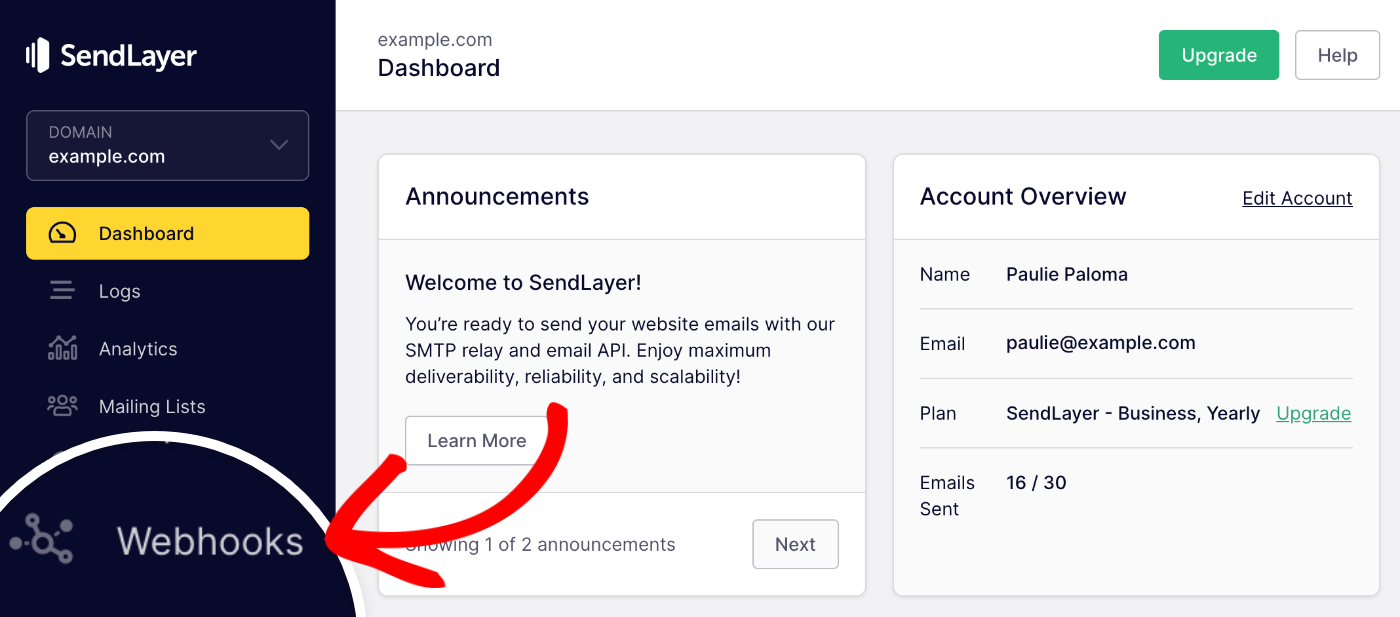
To set one up, log in to SendLayer and click Webhooks in the menu.
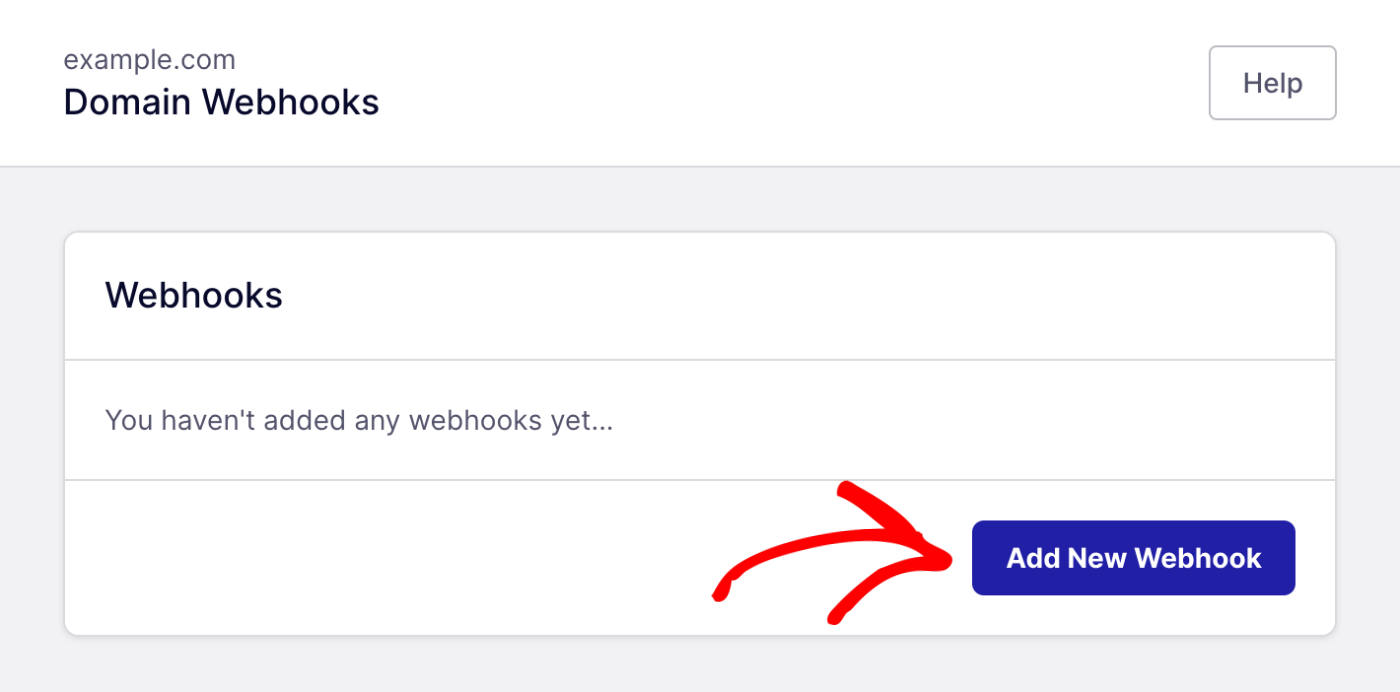
Then click Add New Webhook.
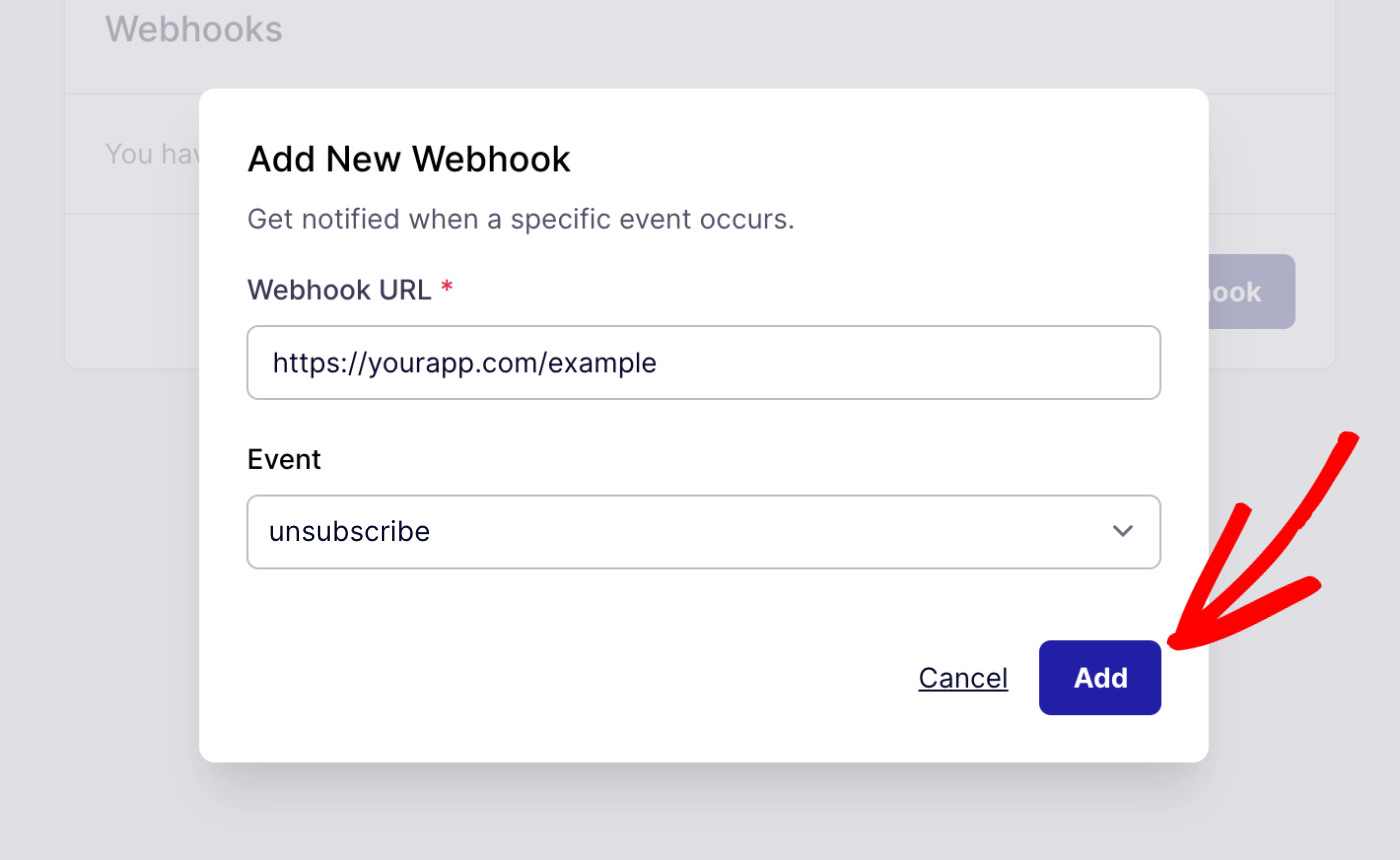
Enter your app’s URL in the Webhook URL field. Pick bounce from the Event dropdown, then click Add.
From then on, SendLayer sends a POST request to your URL whenever an email bounces. It includes details like these:
{
  "EventData": {
    "Event": "bounced",
    "EventType": "failed",
    "BouncedEmailAddress": {
      "EmailAddress": "[email protected]",
      "Status": "smtp;550 5.1.1 User Unknown",
      "DiagnosticCode": "5.1.1 (bad destination mailbox address)"
    }
  }
}
That’s a trimmed version of the payload in SendLayer’s webhooks guide. A 550 5.1.1 code means the mailbox doesn’t exist. Our guide to SMTP error codes explains the rest.
You don’t need to block that address yourself. SendLayer adds hard-bounced addresses to its suppression list automatically, so it won’t email them again.
Use the webhook to keep your own database in sync. Mark the address as bad so your app stops using it, or ask the user for a new one.
Soft bounces are different. They’re often temporary, like a full inbox, so don’t flag those right away.
Also, keep your webhook URL private. Before your app acts on a request, check that it matches the event format above.
Repeated sends to dead addresses hurt your sender reputation, and a hard bounce is the clearest sign to stop.
Frequently Asked Questions
Here are answers to common questions about email regex.
Is RFC 5322 an official standard for email regex?
No. RFC 5322 defines the format of an email address, but it doesn’t include a regex.
Any “RFC 5322 regex” is someone’s attempt to turn that grammar into a pattern. Even the HTML standard chose a simpler rule on purpose.
What is the correct email format for validation?
A valid address has a local part, one @, and a domain. The domain needs at least one dot. The whole address can run to 254 characters. The local part can run to 64.
The regex in this guide checks the format. The functions add separate length checks for the 254 and 64 limits.
How do I check if an email address is real?
Use 3 checks in order:
- A regex for the format.
- An MX lookup to check the domain lists a mail server.
- A confirmation email that the user has to click.
Should I use a library instead of writing my own email regex?
Often, yes: PHP’s filter_var() and Python’s email-validator package handle edge cases for you. A custom regex makes sense when the browser and server need the exact same rule.
That’s it! Now you know how to validate email addresses with regex.
Next, learn how to send that confirmation email. Our guide to sending email with JavaScript covers SMTP and API options step by step.
