


Imagine losing half your sales because of something that had nothing to do with your product.
That’s roughly what a bad experience costs. Qualtrics’ 2026 Consumer Experience Trends report surveyed over 20,000 consumers across 14 countries. 58% said they stop or reduce spending after a bad online retail experience. Of the 18 industries studied, only fast food scored worse.
Customer experience is what builds trust, earns repeat orders, and makes a store stand out. And it isn’t just a tidy website or the lowest price. It’s every touchpoint, from the landing page to the follow-up email three weeks later.
Below are eight practical ways to improve it, plus the part most guides skip: the role your brand’s own communications play.
What Is eCommerce Customer Experience?
eCommerce customer experience is the sum of every interaction someone has with your store, from the first ad they see to the last email you send them.
It’s broader than customer service. Service is what happens when a customer contacts you. Experience includes everything that happens when they don’t: how fast the product page loads, whether the checkout asks for an account, whether the shipping update arrives before they think to look for it.
That breadth is why it’s hard to fix in one place. It’s also why the fixes below cover site mechanics, human support, and automated messaging in roughly equal measure.
Why Communication Is Key in eCommerce
Communication is the part of customer experience you control most directly, and the part most stores pay least attention to.
Every interaction counts, from the copy on a product page to the order confirmation that lands 30 seconds after checkout. Transactional emails carry more of that weight than people expect. They’re automated, triggered by something the customer did, and nobody designs them with much care. But they’re also the messages customers actually open.

Used well, they keep people informed and signal that you’re paying attention. Used badly, or not delivered at all, they’re the first thing a customer notices going wrong.
Building Trust Through Reliability
Every online order is an act of faith. Someone hands over card details for something they can’t inspect, from a company they may not know.
Confirmation emails are the first proof that the faith was justified. Customers expect one almost immediately, and a delay reads as a problem even when nothing is wrong. Prompt order confirmations, shipping updates and delivery notices do quiet, continuous reassurance work.
Slow or failed delivery does the opposite. The customer doesn’t conclude your mail server is misconfigured. They conclude the order didn’t go through, and then they either email support or dispute the charge.

That’s why the sending side matters. A provider like SendLayer exists to make sure those messages arrive. It connects to the platforms most stores already run on: WooCommerce, BigCommerce, PrestaShop and Magento.
Reliability isn’t only about speed, either. Proactive honesty counts too. Telling someone a parcel is delayed before they chase you turns a bad situation into a demonstration that you’re paying attention.
8 Ways to Improve eCommerce Customer Experience
Get the basics right first: navigation that makes sense, pages that work on a phone, product information that answers the obvious questions. Then work through these.

1. Personalize the Shopping Experience
McKinsey’s Next in Personalization research found that 71% of consumers expect personalized interactions, and 76% get frustrated when they don’t get them. Personalization stopped being a differentiator and became a baseline.
Product recommendations are the obvious starting point. Browsing and purchase history tell you what someone is likely to want next, and suggesting it saves them the search.
The less obvious opportunity is in transactional email. Instead of a generic order confirmation, tailor it: suggest something that complements what they bought, or include a code for next time. These are your highest-open-rate messages, and most stores waste them on bare receipts.

Push notifications work for this too. Welcome a new customer with an offer, or nudge someone who left a full cart. There are more ideas for ecommerce push notifications if you want to go further.
2. Streamline the Checkout Process
Checkout is where intent turns into revenue or evaporates. Baymard Institute, which aggregates 50 separate studies, puts the average cart abandonment rate at 70.22%.
More useful than the headline number is why people leave. Among shoppers who had decided to buy:
| Reason for abandoning checkout | Share |
|---|---|
| Extra costs too high (shipping, tax, fees) | 40% |
| Delivery was too slow | 20% |
| Didn’t trust the site with card details | 19% |
| Was required to create an account | 18% |
| Checkout was too long or complicated | 17% |
| Website errors or crashes | 17% |
Two of those are directly fixable in an afternoon. Offer guest checkout and you address the 18% who won’t create an account. Show shipping costs before the final step and you stop surprising the 40%. For the ones who still leave, abandoned cart emails are how you win a share of them back.
Baymard also found the average US checkout shows 23.48 form fields by default, against an ideal of 12 to 14. Most stores are asking for roughly twice what they need.
Then there’s what happens after “Place Order.” A clear confirmation email, fast, with everything at a glance. See our guidance on transactional email design for the specifics.
3. Offer Exceptional Customer Support
Your business isn’t only your website. People remember dealing with a person, and good support turns a problem into a reason to come back.
Offer more than one route in. Some customers want live chat, others email, others the phone. Meeting people where they already are costs less than convincing them to switch channels.

On email specifically: put your contact details and an FAQ link in the footer of every transactional email. And avoid no-reply addresses, so customers can just hit reply about their order.
Support email matters as much as marketing email. When someone opens a ticket, an immediate acknowledgement with a reference number and a realistic timeline does most of the reassurance work on its own.
4. Improve Delivery Updates and Transparency
Customers want to know where their order is without having to ask. Detailed delivery updates are cheap to automate and they remove a whole category of support ticket.

Send at each stage:
- Order confirmed
- Shipped, with a tracking number
- Out for delivery
- Delivered
Recall from the checkout data that 20% of abandoned carts come down to delivery being too slow. People care about timing, so tell them what it is and then keep them posted.
5. Simplify Returns and Refunds
Returns are a cost of doing business online. A clumsy returns process turns them into lost customers as well.
Be specific about the return window and who pays the shipping. Put the policy somewhere obvious, and link it from the order confirmation email. That’s the message customers dig out of their inbox when something goes wrong.
Then keep them posted the same way you would an order: return received, refund processed, money on its way. Silence during a refund is where patience runs out.
6. Keep the Conversation Going After Purchase
Delivery isn’t the end of the relationship. It’s the point where you’ve earned enough goodwill to ask for something.
A few days after the order arrives, ask for a review. You get social proof for the next customer and an early warning about products that disappoint.

Use push notifications and app messages for sales and launches too, sparingly, with an easy opt-out. And don’t skip the plain thank-you. An automated note that reads like a person wrote it does more for repeat business than most discount codes.
7. Implement Loyalty Programs
Loyalty programs reward repeat purchases, which is the cheapest growth there is. Points and discounts are the mechanics, but the part that actually creates loyalty is exclusivity: early access, members-only pricing, something non-members can’t get.
Transactional email is the right channel for it. When someone earns points or reaches a new tier, tell them, and make it clear what they’ve unlocked.

8. Make Sure Those Emails Actually Arrive
Seven sections of this guide lean on email. That only works if the email shows up.
This is the failure mode nobody plans for. An order confirmation in the spam folder isn’t a deliverability statistic, it’s a customer who thinks their payment didn’t go through. A password reset that arrives 20 minutes late is a support ticket. A shipping notice that never lands is a “where is my order?” email you have to answer manually.
Three things cause most of it:
- Unauthenticated email. Without SPF, DKIM and DMARC, inbox providers have no reason to trust you. Gmail, Yahoo and Outlook now require all three from bulk senders. Our guide to email authentication covers the setup.
- Not checking. Most stores discover a delivery problem when a customer reports one. Delivery logs turn that around, and you can check email delivery status directly.
Nobody thanks you for email that arrives. But the whole post-purchase experience is built on it, and it’s the one part of customer experience you can verify rather than guess at.
How To Measure eCommerce Customer Experience
You can’t improve what you’re not tracking, and “customer experience” is vague enough that most stores never start.
Three survey scores cover the perception side:
- NPS asks how likely someone is to recommend you, on a 0 to 10 scale. Good for overall direction, useless for diagnosing anything specific.
- CSAT asks how satisfied someone was with one interaction. Send it after a support ticket or a delivery.
- CES asks how much effort something took. This is the one that finds broken processes, because customers notice friction before they notice dissatisfaction.

Then there are numbers you already have, which are often more honest than survey responses:
| What to watch | What it tells you |
|---|---|
| Cart abandonment rate | Whether checkout is costing you decided buyers |
| Repeat purchase rate | Whether the first experience was good enough to return for |
| Return rate by product | Where product pages are overselling |
| Support tickets per 100 orders | Whether your automated messaging is answering questions or creating them |
That last one is the most useful and the least tracked. If ticket volume per order goes up, something upstream stopped explaining itself, and it’s usually a message that didn’t arrive or didn’t say enough.
Which is why the email metrics belong on the same dashboard: delivery rate, bounce rate, and how long messages take to arrive. They’re leading indicators for the support load you’ll see next week.
Pick two or three of these and watch them consistently. A tracked pair beats a dashboard nobody opens.
Frequently Asked Questions
What is eCommerce customer experience?
It’s the sum of every interaction a shopper has with your store, from the first ad through browsing, checkout, delivery, support and follow-up. It’s wider than customer service, which is only the part where they contact you. A store can have excellent support and still deliver a poor experience through a slow site or a checkout that demands an account.
How do you measure eCommerce customer experience?
Three standard scores cover most of it. NPS asks how likely someone is to recommend you. CSAT measures satisfaction with a specific interaction. CES asks how much effort something took. Pair those with behavioural numbers you already have: cart abandonment rate, return rate, repeat purchase rate, and support tickets per hundred orders.
Why do customers abandon their carts?
Baymard Institute’s aggregate of 50 studies puts average abandonment at 70.22%. Among shoppers who had decided to buy, the leading reasons are extra costs being too high (40%), delivery being too slow (20%), not trusting the site with card details (19%), being required to create an account (18%), and a checkout that’s too long or complicated (17%).
What is the post-purchase experience?
Everything that happens after payment: the confirmation, shipping updates, the delivery itself, returns, and any follow-up. It’s mostly automated, which makes it the cheapest part of customer experience to improve and the most commonly neglected.
Do transactional emails really affect customer experience?
They’re often the only messages a customer reliably opens. Order confirmations, shipping updates and password resets are expected, wanted, and read, which is exactly why a missing or late one does disproportionate damage. Treating them as receipts rather than part of the experience leaves the most-read messages you send doing the least work.
What’s the difference between customer experience and customer service?
Customer service is reactive: it’s what happens when someone needs help. Customer experience is everything, including all the times they don’t need help. Service is one component of experience, and a store can score well on one while failing at the other.
Unlock eCommerce Success Through Customer Experience
Customer experience isn’t one project. It’s site mechanics, human support, and automated messaging, and the stores that get it right treat all three as the same job.
Communication runs through most of it, and email carries most of the communication. Order confirmations, shipping updates and post-purchase follow-ups are what keep customers oriented between clicking buy and opening the box.
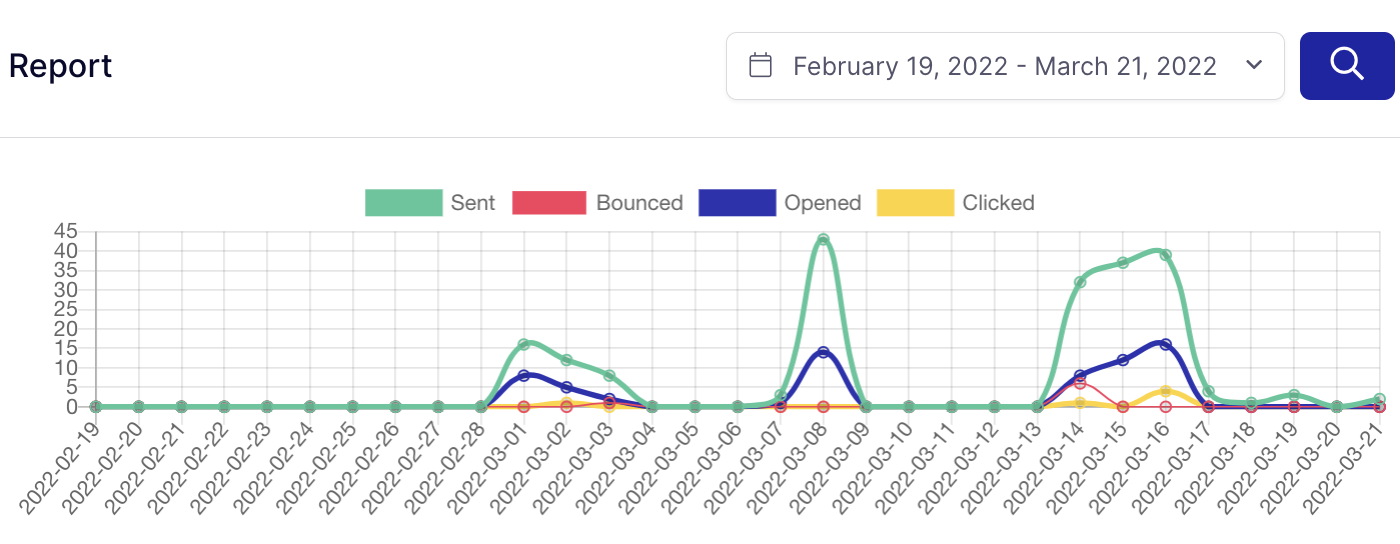
SendLayer’s part is making sure those messages arrive, with delivery logs and metrics so you can see that they did rather than hope. If you want to reduce churn, that’s where to start.
Now you know how to improve your eCommerce customer experience
Next, want to make your order confirmations do more work? Read our guide to order confirmation emails.
Ready to send your emails the fast and reliable way? Get started today with the most user-friendly SMTP email delivery service. SendLayer Business includes 5,000 emails a month with premium support.
