


Your order confirmations and password resets get opened. Transactional emails see open rates of 45-55% across industries.
One caveat before you plan around that gap. Apple’s Mail Privacy Protection covers roughly 46% of the market. It inflates open rates by up to 18 points. Treat open rate as a direction, not a measurement.
Most of those well-opened emails are still generic. Dynamic content is how you fix that.
In this guide, I’ll review some ways to integrate dynamic content into your transactional messages and offer some tips to help you make the most of every email.
- What Is Dynamic Email Content?
- Dynamic vs. Static Email Content
- What Gmail Means by Dynamic Email
- Types of Dynamic Content
- How Dynamic Email Content Works
- How to Add Dynamic Content to Your Emails
- Dynamic Content in Transactional Emails: 7 Examples
- What Goes Wrong (and How to Avoid It)
- Frequently Asked Questions
What Is Dynamic Email Content?
Dynamic email content is any part of an email that changes based on the recipient. Instead of one fixed message for everyone, your template holds placeholders. Each recipient’s own data fills them at send time. That means their name, order, or account status. One template, a different email for every person.
The alternative is static content, where every recipient gets identical text no matter what.
Dynamic vs. Static Email Content
| Static content | Dynamic content | |
|---|---|---|
| What recipients see | The same text for everyone | Content built from their own data |
| Template count | One per audience segment | One template covers all segments |
| Setup effort | Low | Higher up front, lower to maintain |
| Breaks when | Rarely | Data is missing or a condition is wrong |
| Best for | Policy notices, plain announcements | Receipts, shipping, account alerts |
Static isn’t always the wrong choice. A service outage notice says the same thing to everybody. Personalizing it just adds a way for it to break.
What Gmail Means by Dynamic Email
Search for dynamic email and you’ll hit two different topics. It’s worth separating them.
Everything above is about personalized content assembled before you send. Gmail’s dynamic email is a separate feature, built on AMP for Email. It lets a message stay interactive after it lands. Recipients can RSVP, browse a catalog, or fill a form inside the email itself, without opening a browser tab.
Three things to know if you’re considering it:
You have to register with Google first. Google requires senders to register each sending address before Gmail will render the AMP part at all.
Support is narrow. Gmail, Yahoo Mail and Mail.ru render it. Everywhere else, recipients see the plain HTML version. The AMP part travels alongside a normal HTML part as a fallback.
Development has gone quiet. Google hasn’t deprecated it, and Gmail still renders it. But the email spec has had no substantive update since 2023. Build on it with that in mind.
For most senders, personalized content in ordinary HTML does the job with none of this overhead.
Types of Dynamic Content
Dynamic content splits into four groups. Most emails use two or three of them at once.
| Type | Examples |
|---|---|
| User data | Name, location, and account details. Purchase history and preferences. Account status and activity. Custom segments and tags. |
| Behavioral triggers | Abandoned cart contents. Recently viewed items. Payment status. Shipping updates. |
| Real-time elements | Live order tracking. Account balance updates. Product recommendations. Countdown timers. |
| Conditional content | Different blocks for different segments. Language by location. Device-specific layouts. A/B tested elements. |
Start with what you already store. An order record in your database beats a first name pasted at the top. It lets you build a genuinely useful confirmation email.

How Dynamic Email Content Works
Four steps run every time you send.
1. You collect the data. Your app stores what it knows about each user. Basic fields like name and location, plus behavior like what they bought and when they last logged in.
2. Your template holds placeholders. Instead of fixed text, the template contains variables like {{first_name}} or {{order_status}}. Each one marks a slot to be filled.
3. Your code fills the slots. When something triggers the email, your app looks up that user’s record. It passes those values into the template and swaps every placeholder for real data.
4. The finished email sends. Each recipient gets HTML assembled just for them, from one shared template.
The part people underestimate is step 3. That’s where a missing value turns into “Hi ,” in a live customer’s inbox.

How to Add Dynamic Content to Your Emails
Two pieces do most of the work: merge tags and conditional blocks.
Merge Tags
A merge tag is a named placeholder. Syntax varies by tool, but double curly braces are the most common:
<p>Hi {{first_name}}, your order {{order_number}} is on its way.</p>
At send time that becomes:
<p>Hi Pattie, your order #10482 is on its way.</p>
Always Set a Fallback
This is the step that gets skipped, and it’s the one that causes visible breakage. If first_name is empty, the email says “Hi ,”. Give every tag a default:
<p>Hi {{first_name | default: "there"}}, your order is on its way.</p>
Check your template language’s exact syntax for defaults. Every one has it, and they all spell it differently.
Conditional Blocks
Conditionals show or hide whole sections. Most template languages read close to this:
{{#if tracking_url}}
  <a href="{{tracking_url}}">Track your delivery</a>
{{else}}
  <p>We'll email your tracking link as soon as it ships.</p>
{{/if}}
The else branch matters as much as the if. Without it, a customer whose parcel hasn’t shipped sees a gap where the tracking button should be.
Building It With SendLayer
SendLayer sends the HTML you give it. So you build the personalized message in your own app, then pass the finished result to the API. Any template engine works. Jinja for Python, Handlebars or EJS for Node, Blade for Laravel.
Here’s the pattern in Python, using Jinja to render the template and the SendLayer Python SDK to send it:
from jinja2 import Template
from sendlayer import SendLayer

sendlayer = SendLayer('your-api-key')

template = Template("""
  <p>Hi {{ first_name | default('there') }}, order
  {{ order_number }} is on its way.</p>
  {% if tracking_url %}
    <a href="{{ tracking_url }}">Track your delivery</a>
  {% endif %}
""")

html = template.render(
    first_name=user.first_name,
    order_number=order.id,
    tracking_url=order.tracking_url,
)

sendlayer.Emails.send(
    sender="[email protected]",
    to=user.email,
    subject=f"Order {order.id} confirmed",
    html=html,
)
Rendering in your own app has a real advantage for transactional email. Your application already holds the order, the account and the shipping record. You don’t have to sync that data into a separate template system and keep it current.

Dynamic Content in Transactional Emails: 7 Examples
These are real emails. Each one shows a different way to use recipient data in a transactional message. Done well, they add up to a better ecommerce customer experience.
Just Eat: Order Confirmation Email
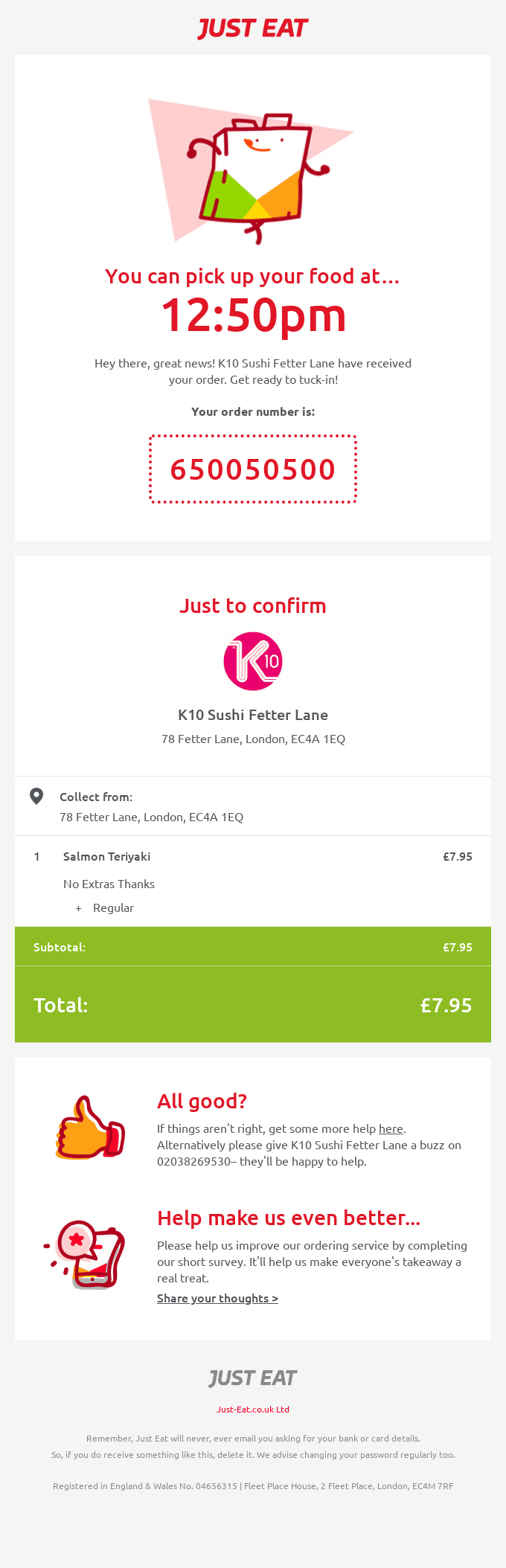
The pickup time is generated from the restaurant’s prep time and current order volume. That makes it specific instead of a generic estimate. Location details and the full address are pulled per restaurant. Each franchise keeps its own information inside one template. Line items carry current prices, customizations, and accurate subtotals.
Hers: Order Confirmation Email

The “Way to start a healthy habit” headline is chosen from the product ordered. A different purchase triggers different copy. The order block shows masked card details, an order ID formatted for support lookups, and the purchase date in the recipient’s timezone. Our guide to order confirmation emails covers this format in more depth.
LinkedIn: Comment Notification Email
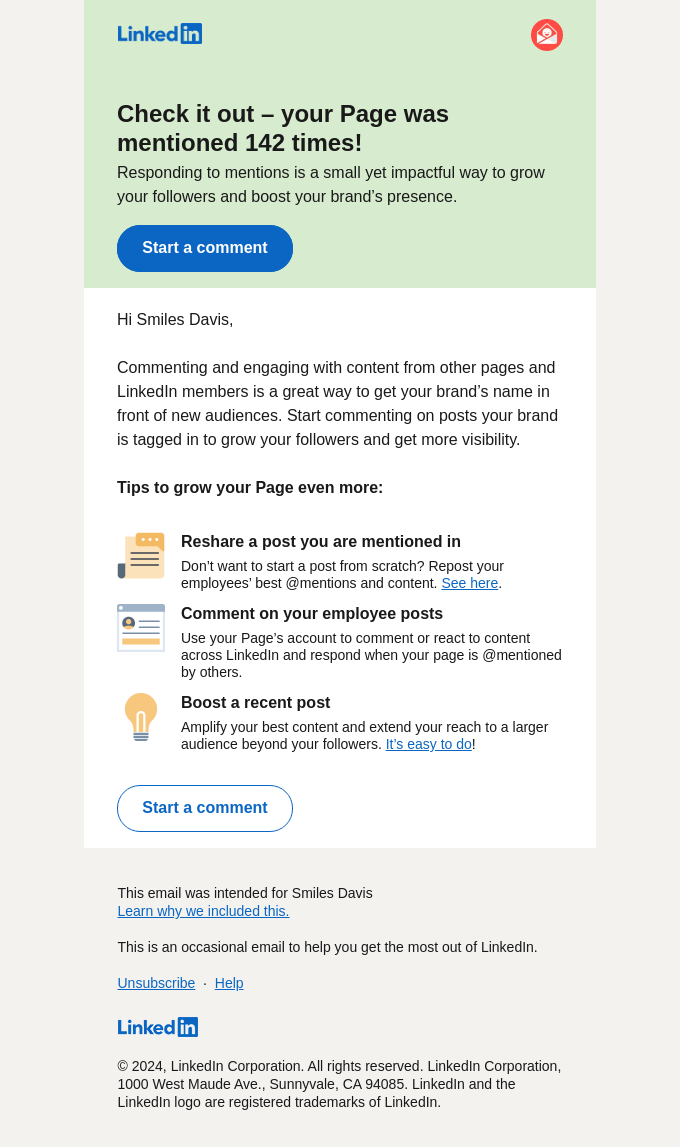
The mention count is tracked live and updates between sends. The tips underneath adapt to the page’s engagement level, size, industry, and recent posting activity. The button links to the specific mention, not a generic inbox. That removes a step.
Google Maps: Customer Appreciation Email

This one fires automatically when certain view milestones are hit. The headline number leads, with smaller past milestones below it to show progress over time. Weekly view counts add recency. The “Contribute now” button appears only after the numbers have made the case.
Fitbit: Shipping Confirmation Email

Background graphics match the product ordered, so the email looks specific to the purchase. The tracking number sits at the top, and the delivery estimate is calculated from the shipping address. Everything visual and every date is tied to this one order.
Sling: Abandoned Cart Reminder Email

The thumbnail grid is built from the viewer’s watch history. The cart block shows the exact package and add-ons they’d selected, not a default bundle. The features listed underneath are the ones that match how this person actually watches. Our roundup of abandoned cart email examples has more of these.
New Balance: Welcome Email

The discount sits under imagery matched to browsing history, in this case athletic leisurewear. The terms shown depend on the recipient’s region and loyalty status. Product picks below are drawn from what they’d viewed. See more patterns in our welcome email examples.
What Goes Wrong (and How to Avoid It)
Dynamic content fails in a small number of predictable ways.
Empty variables reach the inbox. No fallback means “Hi ,” goes out. Set a default on every tag, then send yourself a test with the fields deliberately blank.
Only the happy path gets tested. A conditional with no else leaves a hole for anyone the condition doesn’t match. Test each branch, including the one where the data is missing.
Personalization gets creepy. Confirming what someone bought is expected. Referencing how long they hesitated before buying is not. Use data the recipient knows you have.
Marketing creeps into transactional mail. Promotions in a receipt change what the message legally is. The rules differ for the two types. Keep them apart.
Fallbacks aren’t styled. A default value can run twice as long as the real one. That breaks the layout, and our guide to transactional email design covers the basics. Check your longest and shortest cases, not just the average.
Images and layout aren’t checked. Dynamic blocks change email height and can trigger clipping in Gmail. Preview the assembled email, not the template.
Frequently Asked Questions
What is dynamic email content?
Dynamic email content is any part of an email that changes based on the recipient. One template holds placeholders, and each person’s own data fills them at send time. The result is a different email for every recipient from a single template.
What are examples of dynamic email content?
Common examples are a first name in the greeting, order line items in a receipt, and a live tracking link in a shipping notice. Others include account balance in a statement, product recommendations from browsing history, and countdown timers.
What is dynamic email content in the Gmail app?
That’s a different feature. Gmail’s dynamic email uses AMP for Email to keep a message interactive after delivery. Recipients can RSVP or browse inside the email. It needs registration with Google, and only Gmail, Yahoo Mail and Mail.ru render it.
What’s the difference between dynamic and static email content?
Static content is identical for every recipient. Dynamic content is assembled per recipient from their own data. Static needs one template per audience, dynamic needs one template for all of them.
Does dynamic content hurt deliverability?
Not by itself. Relevant email tends to get better engagement, which helps your sender reputation over time. The risk is mechanical: broken personalization looks like spam to recipients, and complaints hurt domain reputation.
Do I need a special email service for dynamic content?
No. Any provider that accepts HTML works, since you can render the personalized HTML in your own app. Some providers add a template system on top. That’s convenient but optional.
That’s it! Now you know how to use dynamic email content in your emails.
Dynamic content only pays off if the email arrives. Your app assembles the HTML, so you need a provider that sends it reliably and reports back on it. SendLayer handles the delivery side and protects your domain reputation.
Ready to send your emails in the fastest and most reliable way? Get started today with the most user-friendly and powerful SMTP email delivery service. SendLayer Business includes 5,000 emails a month with premium support.
