


Does your FastAPI app need to send password resets, signup confirmations, or form alerts? You can send email in FastAPI a few ways.
FastAPI doesn’t come with an email module, so you choose the method yourself. Put a blocking one in the wrong spot, and every request waits.
In this guide, I’ll show you 4 methods with tested code, plus how to send emails in the background.
How to Send Email in FastAPI
To send email in FastAPI, write a send function and call it from a route. The function can use smtplib, aiosmtplib, the fastapi-mail library, or an email API’s SDK. Pass the send to BackgroundTasks so your route responds before the email goes out.
Here’s how the four methods compare:
| Method | Sync or async | Extra package | Best for |
|---|---|---|---|
smtplib | Sync | None (standard library) | Simple apps and learning the basics |
aiosmtplib | Async | aiosmtplib | async def routes that must await the send |
fastapi-mail | Async | fastapi-mail | Templates, attachments, and built-in test mode |
| Email API (SendLayer SDK) | Sync | sendlayer | Production apps that need delivery tracking |
Prerequisites
You need 3 things before you start:
- Python 3.10 or newer: current FastAPI, Pydantic, aiosmtplib, and fastapi-mail releases all require it.
- Basic FastAPI knowledge: routes, Pydantic models, and running an app with Uvicorn.
- An email provider: I’ll use SendLayer here, but any SMTP or API provider works.
If you use SendLayer, authorize your sending domain first. Unauthorized domains can’t send, and authorization is what keeps your emails out of spam.
Setting Up the FastAPI Project
First, let’s get a clean FastAPI project running. If you already have one, skip to Storing Your SMTP Credentials.
Open your terminal, then create a project folder and move into it:
mkdir fastapi_email
cd fastapi_email
Next, create and activate a virtual environment:
# macOS/Linux
python3 -m venv venv
source venv/bin/activate

# Windows
python -m venv venv
.\venv\Scripts\activate
Now install FastAPI, the Uvicorn server, python-dotenv, and Pydantic’s email extra:
pip install fastapi uvicorn python-dotenv "pydantic[email]"
The [email] extra installs email-validator, which Pydantic’s EmailStr type needs. Skip it and your app fails on startup.
Create a main.py file in your project folder. Start with a “Hello World” route to check everything works:
# main.py
from fastapi import FastAPI

app = FastAPI()

@app.get("/")
def read_root():
    return {"message": "Welcome to the FastAPI Email Demo!"}
Run the app with Uvicorn:
uvicorn main:app --reload
The --reload flag restarts the server whenever you save a change. Open http://127.0.0.1:8000 in your browser, and you’ll see the welcome message.

Now go to http://127.0.0.1:8000/docs. FastAPI generates interactive API docs with Swagger UI.

This is one of my favorite features of FastAPI. It builds a request form for each route. You can test email endpoints without writing a client.
Storing Your SMTP Credentials
To send over SMTP, you need a server host, port, username, and password. I’ll use SendLayer’s SMTP server, but any provider works the same way.
In your SendLayer account, go to Settings » SMTP Credentials.
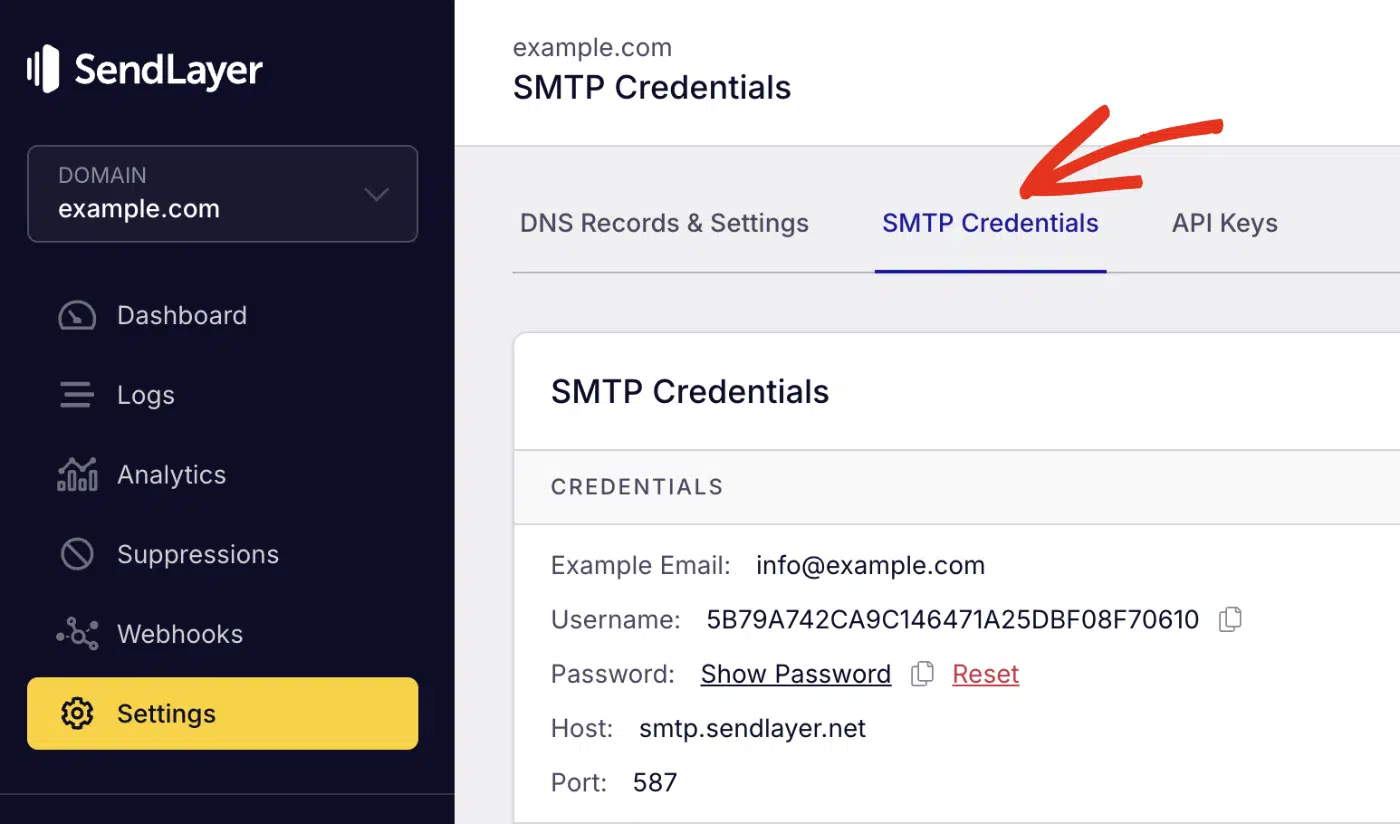
The host and port are the same for every account. Your username and password are unique.
Create a .env file in your project folder and add your credentials:
EMAIL_HOST=smtp.sendlayer.net
EMAIL_PORT=587
EMAIL_USER=your-sendlayer-username
EMAIL_PASS=your-sendlayer-password
SENDER_EMAIL=info@example.com
Replace the placeholders with your real details. SENDER_EMAIL must use the domain you authorized.
Warning: Add .env to your .gitignore file before your first commit. Spammers abuse leaked SMTP passwords fast.
Method 1: Send Email With smtplib
Python’s built-in smtplib module talks directly to an SMTP server. It needs no extra packages, which makes it the easiest place to start.
Step 1: Write the Email Function
Create an email_service.py file to hold the sending logic:
# email_service.py
import os
import smtplib
from email.message import EmailMessage

from dotenv import load_dotenv

load_dotenv()

EMAIL_HOST = os.getenv("EMAIL_HOST")
EMAIL_PORT = int(os.getenv("EMAIL_PORT", "587"))
EMAIL_USER = os.getenv("EMAIL_USER")
EMAIL_PASS = os.getenv("EMAIL_PASS")
SENDER_EMAIL = os.getenv("SENDER_EMAIL")


def send_email_smtp(recipient: str, subject: str, body: str, is_html: bool = False) -> None:
    """Send one email over SMTP. Raises an exception if sending fails."""
    msg = EmailMessage()
    msg["From"] = SENDER_EMAIL
    msg["To"] = recipient
    msg["Subject"] = subject

    if is_html:
        msg.set_content("This email needs an HTML-capable client.")
        msg.add_alternative(body, subtype="html")
    else:
        msg.set_content(body)

    with smtplib.SMTP(EMAIL_HOST, EMAIL_PORT, timeout=10) as server:
        server.starttls()
        server.login(EMAIL_USER, EMAIL_PASS)
        server.send_message(msg)
Code Breakdown
EmailMessage: Python’s modern email class. For HTML,add_alternative()adds an HTML part next to a plain-text fallback.smtplib.SMTP(..., timeout=10): opens the connection. The timeout stops a dead server from hanging your app.withblock: closes the connection even if something fails.starttls(): upgrades the connection to TLS encryption before you log in. Port 587 expects this.login(): authenticates with your SMTP username and password.send_message(): sends the message, reading the sender and recipient from its headers.
The function raises an exception on failure instead of hiding it. That lets your route decide what to tell the caller.
Want attachments or multiple recipients with smtplib? See our guide to sending emails in Python.
Step 2: Create an Email Endpoint
Now connect the function to a route. Replace the contents of main.py with this:
# main.py
from fastapi import FastAPI, HTTPException
from pydantic import BaseModel, EmailStr

from email_service import send_email_smtp

app = FastAPI(title="Email Sender API")


class EmailRequest(BaseModel):
    email: EmailStr
    subject: str
    body: str
    is_html: bool = False


@app.post("/send-email/")
def send_email_endpoint(email_req: EmailRequest):
    try:
        send_email_smtp(
            recipient=email_req.email,
            subject=email_req.subject,
            body=email_req.body,
            is_html=email_req.is_html,
        )
    except Exception as exc:
        raise HTTPException(status_code=500, detail=f"Failed to send email: {exc}")

    return {"message": f"Email sent to {email_req.email}"}
The EmailRequest model defines the request body. EmailStr rejects badly formatted addresses before your code runs.
Notice the route uses plain def, not async def. smtplib is blocking, so FastAPI should run it in its worker thread pool.
Important: Never call blocking code like smtplib inside an async def route. It freezes the event loop, so every other request waits until the send finishes. The FastAPI docs on async explain why plain def is right here.
Step 3: Send a Test Email From Swagger UI
Start your app:
uvicorn main:app --reload
Go to http://127.0.0.1:8000/docs. You’ll see your new /send-email/ route.

Click the route, then click Try it out.

Fill in the request body with a real recipient, a subject, and a message.

Scroll down and click Execute.

You’ll get a 200 response if the send succeeded.

Check the recipient’s inbox for the message from your FastAPI app.

You can also call the route from cURL or a frontend like React or Next.js.
How to Send Emails With FastAPI BackgroundTasks
BackgroundTasks lets your route return a response first, then send the email. The user never waits on the mail server.
That matters because an SMTP send can take a second or more, depending on the mail server.

Here’s the Step 2 route rewritten to use a background task:
# main.py
import logging

from fastapi import BackgroundTasks, FastAPI
from pydantic import BaseModel, EmailStr

from email_service import send_email_smtp

logger = logging.getLogger("email")
app = FastAPI(title="Email Sender API")


class EmailRequest(BaseModel):
    email: EmailStr
    subject: str
    body: str
    is_html: bool = False


def send_email_task(recipient: str, subject: str, body: str, is_html: bool) -> None:
    try:
        send_email_smtp(recipient, subject, body, is_html)
        logger.info("Email sent to %s", recipient)
    except Exception:
        logger.exception("Email to %s failed", recipient)


@app.post("/send-email/", status_code=202)
def send_email_endpoint(email_req: EmailRequest, background_tasks: BackgroundTasks):
    background_tasks.add_task(
        send_email_task,
        email_req.email,
        email_req.subject,
        email_req.body,
        email_req.is_html,
    )
    return {"message": "Email queued"}
Here’s what changed:
background_tasks: BackgroundTasks: FastAPI injects this when you add it as a parameter.add_task(): takes the function, then its arguments. FastAPI runs it after sending the response.status_code=202: means “accepted”. It’s honest, since the email hasn’t gone out yet.send_email_task(): wraps the send intry/exceptand logs the result.
The wrapper matters because the caller already has their response when the send runs. A failure can’t reach them, so the log is the only place it shows up.
Background task functions can be plain def or async def. FastAPI handles both, as the official BackgroundTasks docs explain.
When BackgroundTasks Isn’t Enough
BackgroundTasks runs inside your web server process. That keeps it simple, but it has limits:
- No retries: if the send fails, it’s gone unless you retry yourself.
- Lost on restart: tasks still waiting when the server stops never run.

For password resets and contact form alerts, BackgroundTasks is usually fine. For bulk sends or emails you can’t lose, use a task queue like Celery. An email API also helps, since the provider queues and retries delivery for you.
Method 2: Send Async Emails With aiosmtplib
aiosmtplib is an async SMTP client. Use it in async def routes. You can await the send without blocking the event loop.
Install it:
pip install aiosmtplib
Create an async_email_service.py file:
# async_email_service.py
import os
from email.message import EmailMessage

import aiosmtplib
from dotenv import load_dotenv

load_dotenv()


async def send_email_async(recipient: str, subject: str, body: str) -> None:
    msg = EmailMessage()
    msg["From"] = os.getenv("SENDER_EMAIL")
    msg["To"] = recipient
    msg["Subject"] = subject
    msg.set_content(body)

    await aiosmtplib.send(
        msg,
        hostname=os.getenv("EMAIL_HOST"),
        port=int(os.getenv("EMAIL_PORT", "587")),
        username=os.getenv("EMAIL_USER"),
        password=os.getenv("EMAIL_PASS"),
        start_tls=True,
        timeout=10,
    )
Then await it from an async def route:
# main.py
from fastapi import FastAPI, HTTPException
from pydantic import BaseModel, EmailStr

from async_email_service import send_email_async

app = FastAPI()


class EmailRequest(BaseModel):
    email: EmailStr
    subject: str
    body: str


@app.post("/send-email-async/")
async def send_email_endpoint(email_req: EmailRequest):
    try:
        await send_email_async(email_req.email, email_req.subject, email_req.body)
    except Exception as exc:
        raise HTTPException(status_code=500, detail=f"Failed to send email: {exc}")
    return {"message": f"Email sent to {email_req.email}"}
start_tls=True does the same job as starttls() in smtplib. If you use a different provider that wants port 465, set use_tls=True instead. The aiosmtplib encryption docs cover both options.
Async doesn’t make the send itself faster. It frees the server to handle other requests while it waits. To return before the email goes out, you still want BackgroundTasks.
Method 3: Send Emails With the fastapi-mail Library
fastapi-mail wraps async SMTP in a FastAPI-friendly API. It adds Jinja2 templates, attachments, and a test mode that skips the real send.
Install it:
pip install fastapi-mail
Here’s a complete route that sends an HTML email in the background:
# main.py
import os

from dotenv import load_dotenv
from fastapi import BackgroundTasks, FastAPI
from fastapi_mail import ConnectionConfig, FastMail, MessageSchema, MessageType
from pydantic import BaseModel, EmailStr

load_dotenv()

conf = ConnectionConfig(
    MAIL_USERNAME=os.getenv("EMAIL_USER"),
    MAIL_PASSWORD=os.getenv("EMAIL_PASS"),
    MAIL_FROM=os.getenv("SENDER_EMAIL"),
    MAIL_SERVER=os.getenv("EMAIL_HOST"),
    MAIL_PORT=int(os.getenv("EMAIL_PORT", "587")),
    MAIL_STARTTLS=True,
    MAIL_SSL_TLS=False,
    USE_CREDENTIALS=True,
    VALIDATE_CERTS=True,
)

app = FastAPI()


class EmailRequest(BaseModel):
    recipients: list[EmailStr]
    subject: str
    body: str


@app.post("/send-fastapi-mail/")
async def send_with_fastapi_mail(email_req: EmailRequest, background_tasks: BackgroundTasks):
    message = MessageSchema(
        subject=email_req.subject,
        recipients=email_req.recipients,
        body=email_req.body,
        subtype=MessageType.html,
    )
    fm = FastMail(conf)
    background_tasks.add_task(fm.send_message, message)
    return {"message": "Email queued"}
A few things to know about this code:
ConnectionConfig: holds your SMTP settings. You must set bothMAIL_STARTTLSandMAIL_SSL_TLS. For port 587, set STARTTLS toTrueand SSL/TLS toFalse.MessageSchema: describes the email.subtype=MessageType.htmlsends HTML. UseMessageType.plainfor text.fm.send_message: an async function, passed straight toadd_task().
For templates, set TEMPLATE_FOLDER in the config and pass template_name to send_message(). The fastapi-mail examples page covers templates and attachments.
Pro Tip: Set SUPPRESS_SEND=1 in ConnectionConfig while testing. fastapi-mail then skips the real send, and fm.record_messages() captures what would have gone out.
Method 4: Send Emails With an Email API
An email API sends over HTTPS instead of SMTP. The provider handles queueing, retries, and sender reputation. You can also check each email’s delivery status.

Other benefits include:
- Delivery data: see opens, clicks, and bounces per message.
- Fewer moving parts: no SMTP connection or TLS handshake to manage.
I’ll use SendLayer’s Python SDK for this example.
Get Your SendLayer API Key
Your API key lives under Settings » API Keys. Log in to SendLayer and open that tab.
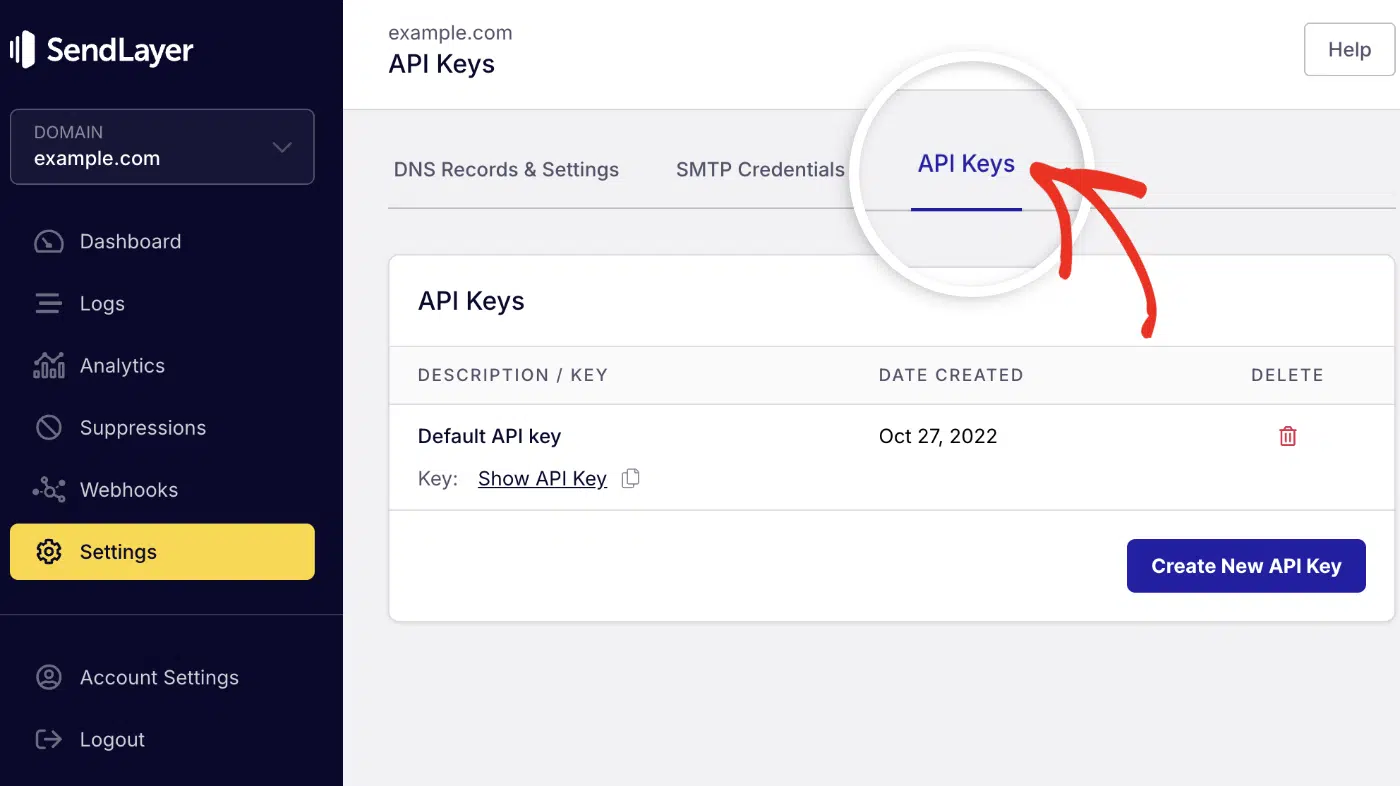
Click the copy icon next to your default API key.

Add the key to your .env file:
SENDLAYER_API_KEY=your-api-key
SENDER_EMAIL=paulie@example.com
The sender address must use a domain you’ve authorized in SendLayer. If you authorized example.com, send from an @example.com address.
SendLayer sends from a subdomain it sets up for you. That protects your main domain’s reputation if something goes wrong with deliverability.
Then install the SendLayer Python SDK:
pip install sendlayer
Send HTML Emails With the SendLayer SDK
Create a sendlayer_service.py file:
# sendlayer_service.py
import os

from dotenv import load_dotenv
from sendlayer import SendLayer

load_dotenv()

sendlayer = SendLayer(os.getenv("SENDLAYER_API_KEY"))


def sl_send_email(recipient: str, subject: str, body: str, is_html: bool = False) -> dict:
    """Send an email with the SendLayer API. Raises SendLayerError on failure."""
    params = {
        "sender": os.getenv("SENDER_EMAIL"),
        "to": recipient,
        "subject": subject,
        "html": body if is_html else None,
        "text": None if is_html else body,
    }
    return sendlayer.Emails.send(**params)
Emails.send() takes the sender, recipient, subject, and either html or text. It returns the API’s response, which includes the message ID.
In real apps, you’ll usually build body from a Jinja2 HTML template.
Create a Route for the API Email Function
Now add a route that calls it. Update main.py:
# main.py
from fastapi import FastAPI, HTTPException
from pydantic import BaseModel, EmailStr
from sendlayer.exceptions import SendLayerError

from sendlayer_service import sl_send_email

app = FastAPI(title="Email Sender API")


class SendlayerEmailRequest(BaseModel):
    recipient: EmailStr
    subject: str
    body: str
    is_html: bool = False


@app.post("/send-api-email/")
def send_api_email(email_req: SendlayerEmailRequest):
    try:
        response = sl_send_email(
            recipient=email_req.recipient,
            subject=email_req.subject,
            body=email_req.body,
            is_html=email_req.is_html,
        )
    except SendLayerError as exc:
        raise HTTPException(status_code=502, detail=str(exc))

    return {"message": "Email sent", "response": response}
The route uses def because the SDK makes a blocking HTTP request. If the API rejects the email, the 502 response carries SendLayer’s error message.
Want it in the background? Use background_tasks.add_task(sl_send_email, ...), as in the BackgroundTasks section.
Send Email to Multiple Recipients
The SDK’s to, cc, and bcc fields each accept a list. Each entry can be a plain address or a dict with name and email:
params = {
    "sender": {"name": "Paulie", "email": os.getenv("SENDER_EMAIL")},
    "to": [
        {"name": "Recipient 1", "email": "recipient1@example.com"},
        {"name": "Recipient 2", "email": "recipient2@example.com"},
    ],
    "cc": ["cc@example.com"],
    "bcc": [{"name": "BCC", "email": "bcc@example.com"}],
    "subject": subject,
    "html": body if is_html else None,
    "text": None if is_html else body,
}
To accept several recipients through your route, change the model field to recipient: list[EmailStr]. Then send a JSON array:
{
  "recipient": ["recipient1@example.com", "recipient2@example.com"],
  "subject": "Your order shipped",
  "body": "<p>It's on the way.</p>",
  "is_html": true
}
SendLayer limits how many recipients one request can include. Check the rate limit docs before sending to large lists.
Send Emails With Attachments in FastAPI
Add an attachments list to params. Each attachment needs a path and a MIME type:
params = {
    "sender": os.getenv("SENDER_EMAIL"),
    "to": recipient,
    "subject": subject,
    "html": body if is_html else None,
    "text": None if is_html else body,
    "attachments": [
        {"path": "invoices/invoice-1042.pdf", "type": "application/pdf"},
        {"path": "https://example.com/terms.pdf", "type": "application/pdf"},
    ],
}
The path can be a local file or a URL. The SDK reads and encodes the file. The file name becomes the attachment name.
Not sure which MIME type to use? See MDN’s list of common MIME types.
Best Practices for Sending Email in FastAPI
These habits keep your email code safe and easy to debug.
Keep Credentials in Environment Variables
Never commit API keys or SMTP passwords to Git. Load them from environment variables, as every example above does with python-dotenv.
In production, set the variables in your host’s settings instead of shipping a .env file.
Handle Errors and Log Failures
Networks fail and providers reject emails. Wrap each send in try/except, then return a clear status from the route.
In background tasks, log every failure with Python’s logging module. Nobody else will see the error.
Validate Email Addresses With EmailStr
Pydantic’s EmailStr checks an address’s format before your route runs. A bad address gets an automatic 422 response. Your code never tries to send to it.
EmailStr only checks the format. It can’t tell whether the mailbox exists. The SendLayer SDK also checks sender, recipient, CC, and BCC addresses before calling the API.
Troubleshooting FastAPI Email Errors
Here are the errors you’re most likely to hit, with the fix for each.
SMTPAuthenticationError (535)
The server rejected your username or password. Copy both again from your provider’s dashboard, and check .env for stray spaces or quotes.
If you’re using Gmail, you need an app password, not your normal password.
The Endpoint Is Slow or Hangs
You’re probably calling smtplib or another blocking client inside an async def route. Change the route to def, switch to aiosmtplib, or move the send into BackgroundTasks.
“email-validator is not installed”
EmailStr needs the email-validator package. Run pip install "pydantic[email]" and restart the server.
The Background Email Never Arrives, With No Error
Background task failures don’t reach the caller. Add logging inside the task function, as in the BackgroundTasks example. Then check your server logs.
Connection Timeout on Port 587
Some hosts and networks block outgoing SMTP ports. If 587 is blocked, try SendLayer’s alternate port 2525, which also uses STARTTLS. Or switch to an email API, which uses HTTPS on port 443.
SendLayerValidationError: “Attachment path is required”
Each attachment dict needs a path key, not name. Use {"path": "file.pdf", "type": "application/pdf"}.
FAQs About FastAPI Email
Here are answers to the questions developers ask most about FastAPI email.
How can I send emails asynchronously in FastAPI?
You have two options. Use aiosmtplib or fastapi-mail to await the send in an async def route.
Or pass the send to BackgroundTasks so the route responds first. Most apps want this.
Is it possible to send bulk emails using FastAPI?
Yes, but don’t loop through thousands of sends inside a request. Move the work to a background task or a task queue. For large volumes, an email API handles throttling and retries better than your own loop.
How can I make sure my emails aren’t marked as spam?
Set up SPF, DKIM, and DMARC for your sending domain. Send through a reputable provider rather than your web host’s mail server. Keep content clean, with working HTML and a sensible text-to-image ratio.
Should I use BackgroundTasks or Celery for emails?
Use BackgroundTasks for small, one-off emails like password resets and signup confirmations. Use Celery or another task queue when you need retries, scheduling, or restart safety.
How do I test FastAPI email code without sending real emails?
With fastapi-mail, set SUPPRESS_SEND=1 and capture messages with fm.record_messages(). With other methods, mock the send function in your tests. Or point your app at a local test SMTP server.
How do I send a password reset email in FastAPI?
Create a random, single-use token with Python’s secrets.token_urlsafe(). Store a hash of it with an expiry time, then email the user a link that contains the token.
Send that email from BackgroundTasks so the reset form responds right away. When the user clicks the link, check the token, then delete it.
Is fastapi-mail better than smtplib?
fastapi-mail is async and adds templates, attachments, and a test mode. smtplib needs no extra package but blocks while it sends. For a FastAPI app, I’d pick fastapi-mail or an email API over raw smtplib.
That’s It! Now You Can Send Email From FastAPI
You’ve sent email from FastAPI with smtplib, BackgroundTasks, aiosmtplib, fastapi-mail, and the SendLayer API.
Next, try another Python framework. See our guides on sending email in Django and sending email in Flask.
